<?xml version="1.0" encoding="utf-8"?><feed xmlns="http://www.w3.org/2005/Atom" ><generator uri="https://jekyllrb.com/" version="3.10.0">Jekyll</generator><link href="https://yeedawon.github.io/feed.xml" rel="self" type="application/atom+xml" /><link href="https://yeedawon.github.io/" rel="alternate" type="text/html" /><updated>2026-03-07T02:06:02+00:00</updated><id>https://yeedawon.github.io/feed.xml</id><title type="html">DAWON’s BLOG</title><subtitle>wanna be a AI/ML Engineer</subtitle><author><name>Lee DaWon</name></author><entry><title type="html">[Spring Boot] 라이브러리 vs 프레임워크</title><link href="https://yeedawon.github.io/springboot/2026/02/26/springboot-01-lbvsfw/" rel="alternate" type="text/html" title="[Spring Boot] 라이브러리 vs 프레임워크" /><published>2026-02-26T00:00:00+00:00</published><updated>2026-02-26T00:00:00+00:00</updated><id>https://yeedawon.github.io/springboot/2026/02/26/springboot-01-lbvsfw</id><content type="html" xml:base="https://yeedawon.github.io/springboot/2026/02/26/springboot-01-lbvsfw/"><![CDATA[<div class="callout callout-src">
  <div class="callout-title">📺 참조 강의</div>
  방구석코더 — Spring Boot 기초 강의 (2026.01.04~) &nbsp;·&nbsp;
  <a href="https://www.youtube.com/@bang_gusuk_coder/videos" target="_blank">유튜브 채널 바로가기</a>
</div>

<div class="callout callout-git">
  <div class="callout-title">🔗 실습 코드 레포지토리</div>
  <a href="https://github.com/yeedawon/myblog" target="_blank">github.com/yeedawon/myblog</a>
  &nbsp;—&nbsp; master 브랜치 / Java 100% / 17 commits
</div>

<h2 id="spring은-프레임워크야-lombok은-라이브러리야">“Spring은 프레임워크야.” “Lombok은 라이브러리야.”</h2>

<p>둘 다 <strong>“이미 제작해 둔 코드를 가져다 쓰는 것”</strong>인데, 왜 굳이 구분할까 의문이 들었습니다.
단순히 용어 차이가 아니라, <strong>내 코드와 어떤 관계로 동작하는가</strong>가 완전히 다르기 때문임을 알게 되었습니다.</p>

<hr />

<h2 id="가장-쉬운-비유--요리">가장 쉬운 비유 — 요리</h2>

<div class="diagram">  [ 라이브러리 ]                       [ 프레임워크 ]

  요리 도구                         식당(레시피 / 구축된 주방 시스템)
  레시피(라이브러리)를 필요할 때         주방 규칙(프레임워크)이 이미 정해져 있음.
  꺼내서 참고함.                         내 역할(코드)은 규칙 안에서만 수행.
</div>

<hr />

<h2 id="라이브러리-library">라이브러리 (Library)</h2>

<h3 id="정의">정의</h3>

<blockquote>
  <p>특정 기능을 수행하는 코드의 모음. <strong>내 코드가 필요할 때 호출해서 사용한다.</strong>
말 그대로 라이브러리 “도서관”같이 꺼내다 쓰는 개념입니다.</p>
</blockquote>

<h3 id="특징">특징</h3>

<table>
  <thead>
    <tr>
      <th>항목</th>
      <th>내용</th>
    </tr>
  </thead>
  <tbody>
    <tr>
      <td>호출 주체</td>
      <td><strong>내 코드</strong>가 라이브러리를 호출</td>
    </tr>
    <tr>
      <td>흐름 제어</td>
      <td><strong>내 코드</strong>가 전체 흐름을 결정</td>
    </tr>
    <tr>
      <td>사용 방식</td>
      <td>필요한 함수·클래스를 import 후 직접 호출</td>
    </tr>
    <tr>
      <td>교체 가능성</td>
      <td>비교적 자유롭게 교체 가능</td>
    </tr>
  </tbody>
</table>

<h3 id="java-예시--lombok">Java 예시 — Lombok</h3>

<div class="language-java highlighter-rouge"><div class="highlight"><pre class="highlight"><code><span class="kn">import</span> <span class="nn">lombok.Getter</span><span class="o">;</span>         <span class="c1">// ← 라이브러리 import</span>
<span class="kn">import</span> <span class="nn">lombok.NoArgsConstructor</span><span class="o">;</span>

<span class="nd">@Getter</span>                       <span class="c1">// ← 내 코드가 라이브러리 기능을 '선택적으로' 사용</span>
<span class="nd">@NoArgsConstructor</span>
<span class="kd">public</span> <span class="kd">class</span> <span class="nc">Article</span> <span class="o">{</span>
    <span class="kd">private</span> <span class="nc">Long</span> <span class="n">id</span><span class="o">;</span>
    <span class="kd">private</span> <span class="nc">String</span> <span class="n">title</span><span class="o">;</span>
<span class="o">}</span>
</code></pre></div></div>

<p><code class="language-plaintext highlighter-rouge">@Getter</code>가 필요 없으면 그냥 안 쓰면 됩니다.<br />
Lombok이 내 코드 실행 흐름을 건드리지 않습니다.</p>

<h3 id="다른-대표적인-라이브러리들">다른 대표적인 라이브러리들</h3>

<table>
  <thead>
    <tr>
      <th>라이브러리</th>
      <th>언어</th>
      <th>역할</th>
    </tr>
  </thead>
  <tbody>
    <tr>
      <td>Lombok</td>
      <td>Java</td>
      <td>반복 코드 자동 생성</td>
    </tr>
    <tr>
      <td>Jackson</td>
      <td>Java</td>
      <td>JSON ↔ Java 객체 변환</td>
    </tr>
    <tr>
      <td>NumPy</td>
      <td>Python</td>
      <td>수치 연산</td>
    </tr>
    <tr>
      <td>pandas</td>
      <td>Python</td>
      <td>데이터 처리</td>
    </tr>
    <tr>
      <td>React</td>
      <td>JavaScript</td>
      <td>UI 컴포넌트 구성</td>
    </tr>
  </tbody>
</table>

<hr />

<h2 id="프레임워크-framework">프레임워크 (Framework)</h2>

<h3 id="정의-1">정의</h3>

<blockquote>
  <p>애플리케이션의 <strong>뼈대(골격)</strong>. 내 코드가 프레임워크가 정한 규칙과 구조 안에서 동작합니다.</p>
</blockquote>

<h3 id="특징-1">특징</h3>

<table>
  <thead>
    <tr>
      <th>항목</th>
      <th>내용</th>
    </tr>
  </thead>
  <tbody>
    <tr>
      <td>호출 주체</td>
      <td><strong>프레임워크</strong>가 내 코드를 호출</td>
    </tr>
    <tr>
      <td>흐름 제어</td>
      <td><strong>프레임워크</strong>가 전체 흐름을 결정</td>
    </tr>
    <tr>
      <td>사용 방식</td>
      <td>정해진 규칙(어노테이션, 클래스 상속 등)에 맞게 코드 작성</td>
    </tr>
    <tr>
      <td>교체 가능성</td>
      <td>어려움. 코드 전체가 프레임워크에 결합됨</td>
    </tr>
  </tbody>
</table>

<h3 id="java-예시--spring-boot">Java 예시 — Spring Boot</h3>

<div class="language-java highlighter-rouge"><div class="highlight"><pre class="highlight"><code><span class="nd">@RestController</span>                    <span class="c1">// ← Spring이 이 클래스를 HTTP 처리용으로 인식</span>
<span class="nd">@RequestMapping</span><span class="o">(</span><span class="s">"/api/articles"</span><span class="o">)</span>
<span class="kd">public</span> <span class="kd">class</span> <span class="nc">ArticleController</span> <span class="o">{</span>

    <span class="nd">@GetMapping</span><span class="o">(</span><span class="s">"/{id}"</span><span class="o">)</span>           <span class="c1">// ← Spring이 GET 요청이 오면 이 메서드를 '알아서 호출'</span>
    <span class="kd">public</span> <span class="nc">String</span> <span class="nf">getArticle</span><span class="o">(</span><span class="nd">@PathVariable</span> <span class="nc">Long</span> <span class="n">id</span><span class="o">)</span> <span class="o">{</span>
        <span class="k">return</span> <span class="s">"article: "</span> <span class="o">+</span> <span class="n">id</span><span class="o">;</span>
    <span class="o">}</span>
<span class="o">}</span>
</code></pre></div></div>

<p><code class="language-plaintext highlighter-rouge">getArticle()</code> 메서드를 <strong>사용자가 직접 호출하지 않습니다</strong><br />
HTTP GET 요청이 들어오면 <strong>Spring이 알아서 찾아서 실행</strong>합니다.</p>

<hr />

<div class="language-java highlighter-rouge"><div class="highlight"><pre class="highlight"><code><span class="c1">// 내가 main()을 실행하면...</span>
<span class="nc">SpringApplication</span><span class="o">.</span><span class="na">run</span><span class="o">(</span><span class="nc">YeedawonApplication</span><span class="o">.</span><span class="na">class</span><span class="o">,</span> <span class="n">args</span><span class="o">);</span>

<span class="c1">// 이후 HTTP 요청이 오면 Spring이 알아서:</span>
<span class="c1">// 1. 어떤 Controller에 보낼지 판단</span>
<span class="c1">// 2. 해당 메서드를 직접 호출</span>
<span class="c1">// 3. 반환값을 HTTP 응답으로 변환</span>
<span class="c1">// → 이 모든 흐름을 내가 짜지 않았다 = 프레임워크</span>
</code></pre></div></div>

<p>반면 Lombok은:</p>

<div class="language-java highlighter-rouge"><div class="highlight"><pre class="highlight"><code><span class="c1">// @Getter를 붙였더니 getTitle() 메서드가 생긴다</span>
<span class="c1">// 하지만 Lombok이 내 코드 흐름을 바꾸지는 않는다 = 라이브러리</span>
</code></pre></div></div>

<hr />

<h2 id="정리">정리</h2>

<div class="callout callout-note">
  <div class="callout-title">💡 한 문장 요약</div>
  <strong>라이브러리</strong>는 내가 불러서 쓰는 도구이고,
  <strong>프레임워크</strong>는 나를 불러서 쓰는 구조입니다
</div>

<table>
  <thead>
    <tr>
      <th>개념</th>
      <th>핵심 문장</th>
    </tr>
  </thead>
  <tbody>
    <tr>
      <td>라이브러리</td>
      <td>내 코드가 라이브러리를 <strong>호출</strong>한다</td>
    </tr>
    <tr>
      <td>프레임워크</td>
      <td>프레임워크가 내 코드를 <strong>호출</strong>한다</td>
    </tr>
    <tr>
      <td>실제로는…</td>
      <td>프레임워크(Spring Boot) 안에서 라이브러리(Lombok 등)를 <strong>함께 사용</strong>한다</td>
    </tr>
  </tbody>
</table>

<p>Java만 1학년 때 공부한 입장에서 제가 호출하지도 않은 메소드가 자동으로 왜 사용이 되는가 궁금했었는데,
외부에서 GET/POST 등의 HTTP의 헤더 부분의 메소드로 요청이 들어오면,
<strong>“프레임워크가 이를 인식”</strong>하면서 작동하는 방식임을 배우게 되었습니다.</p>]]></content><author><name>yeedawon</name></author><category term="springboot" /><category term="library" /><category term="framework" /><category term="ioc" /><category term="spring" /><category term="java" /><category term="개념" /><summary type="html"><![CDATA[spring boot가 어떤 것인지, 도중에 사용하는 lombok과 비교하여 프레임워크와 라이브러리에 대해 설명]]></summary></entry><entry><title type="html">[Network] 응용 계층 — HTTP, DNS, URI</title><link href="https://yeedawon.github.io/network/2026/02/20/network-03-http-dns-uri/" rel="alternate" type="text/html" title="[Network] 응용 계층 — HTTP, DNS, URI" /><published>2026-02-20T00:00:00+00:00</published><updated>2026-02-20T00:00:00+00:00</updated><id>https://yeedawon.github.io/network/2026/02/20/network-03-http-dns-uri</id><content type="html" xml:base="https://yeedawon.github.io/network/2026/02/20/network-03-http-dns-uri/"><![CDATA[<div class="callout callout-src">
  <div class="callout-title">📚 참조</div>
  ① 혼자 공부하는 네트워크 복습 노트<br />
  ② 강의 1편: <a href="https://youtu.be/c_4x5M_GwD8?si=Mh525VtBjlHnpTYI" target="_blank">youtu.be/c_4x5M_GwD8</a> &nbsp;
  ③ 강의 2편: <a href="https://youtu.be/k7G1wXTB8Fk?si=UhoHYeayG7C_xnFK" target="_blank">youtu.be/k7G1wXTB8Fk</a>
</div>

<h2 id="응용-계층이란">응용 계층이란?</h2>

<p>TCP/IP 4계층 중 사용자와 <strong>직접 맞닿은 최상위 계층</strong>입니다.
HTTP, DNS, FTP, SSH 등 실제로 눈에 보이는 서비스가 모두 여기에 속합니다.</p>

<p><strong>주요 응용 계층 프로토콜</strong></p>

<table>
  <thead>
    <tr>
      <th>프로토콜</th>
      <th>포트</th>
      <th>전송 계층</th>
      <th>역할</th>
    </tr>
  </thead>
  <tbody>
    <tr>
      <td><strong>HTTP</strong></td>
      <td>80</td>
      <td>TCP</td>
      <td>웹</td>
    </tr>
    <tr>
      <td><strong>HTTPS</strong></td>
      <td>443</td>
      <td>TCP</td>
      <td>보안 웹</td>
    </tr>
    <tr>
      <td><strong>DNS</strong></td>
      <td>53</td>
      <td>UDP (조회) / TCP (큰 응답)</td>
      <td>도메인 → IP 변환</td>
    </tr>
    <tr>
      <td>SSH</td>
      <td>22</td>
      <td>TCP</td>
      <td>원격 접속</td>
    </tr>
    <tr>
      <td>FTP</td>
      <td>20, 21</td>
      <td>TCP</td>
      <td>파일 전송</td>
    </tr>
    <tr>
      <td>DHCP</td>
      <td>67, 68</td>
      <td>UDP</td>
      <td>IP 자동 할당</td>
    </tr>
    <tr>
      <td>SMTP</td>
      <td>25</td>
      <td>TCP</td>
      <td>이메일 전송</td>
    </tr>
  </tbody>
</table>

<hr />

<h2 id="http-hypertext-transfer-protocol">HTTP (HyperText Transfer Protocol)</h2>

<h3 id="네-가지-핵심-특성">네 가지 핵심 특성</h3>

<p><strong>① 요청-응답 기반</strong></p>

<p>클라이언트가 요청을 보내면 서버가 응답합니다. 서버가 먼저 보낼 수 없습니다.
(단, WebSocket은 양방향 통신 가능)</p>

<p><strong>② 미디어 독립적 (Media-Independent)</strong></p>

<p>자원의 형태와 무관하게 동일한 인터페이스로 주고받습니다.
자원 형태는 <code class="language-plaintext highlighter-rouge">Content-Type</code> 헤더로 알립니다.</p>

<table>
  <thead>
    <tr>
      <th>Content-Type</th>
      <th>의미</th>
    </tr>
  </thead>
  <tbody>
    <tr>
      <td><code class="language-plaintext highlighter-rouge">text/html; charset=utf-8</code></td>
      <td>HTML 문서</td>
    </tr>
    <tr>
      <td><code class="language-plaintext highlighter-rouge">application/json</code></td>
      <td>JSON 데이터 (REST API 응답)</td>
    </tr>
    <tr>
      <td><code class="language-plaintext highlighter-rouge">image/jpeg</code></td>
      <td>JPEG 이미지</td>
    </tr>
    <tr>
      <td><code class="language-plaintext highlighter-rouge">multipart/form-data</code></td>
      <td>파일 업로드</td>
    </tr>
  </tbody>
</table>

<p><strong>③ 스테이트리스 (Stateless)</strong></p>

<p>서버는 클라이언트의 이전 요청을 기억하지 않습니다. 각 요청은 독립적입니다.</p>

<table>
  <thead>
    <tr>
      <th>항목</th>
      <th>설명</th>
    </tr>
  </thead>
  <tbody>
    <tr>
      <td>장점</td>
      <td>서버 확장 용이, 특정 서버에 종속되지 않음</td>
    </tr>
    <tr>
      <td>단점</td>
      <td>상태 유지를 위한 별도 수단 필요</td>
    </tr>
    <tr>
      <td>해결 방법</td>
      <td>Cookie, Session, <strong>JWT 토큰</strong> (매 요청 헤더에 포함)</td>
    </tr>
  </tbody>
</table>

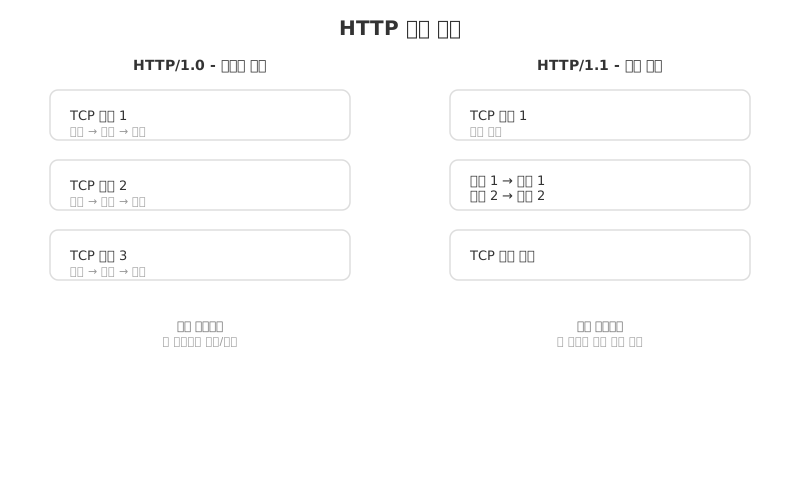
<p><strong>④ 지속 연결 (Persistent Connection / Keep-Alive)</strong></p>

<p>HTTP/1.1부터 기본값입니다. 하나의 TCP 연결로 여러 요청·응답을 처리합니다.</p>

<p><img src="/assets/images/network/post3-http-dns-uri/http-persistent.svg" alt="HTTP 지속 연결 비교" style="max-width: 100%;" /></p>

<hr />

<h2 id="http-메시지-구조">HTTP 메시지 구조</h2>

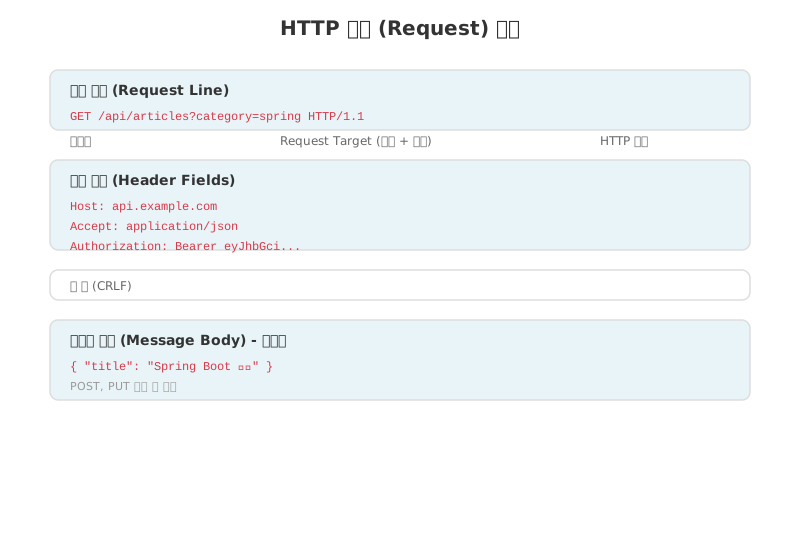
<h3 id="요청-메시지-request">요청 메시지 (Request)</h3>

<p><img src="/assets/images/network/post3-http-dns-uri/http-request.svg" alt="HTTP 요청 메시지 구조" style="max-width: 100%;" /></p>

<h3 id="http-메서드">HTTP 메서드</h3>

<table>
  <thead>
    <tr>
      <th>메서드</th>
      <th>의미</th>
      <th>멱등성</th>
      <th>주로 사용하는 상황</th>
    </tr>
  </thead>
  <tbody>
    <tr>
      <td><strong>GET</strong></td>
      <td>자원 조회</td>
      <td>✅</td>
      <td>목록 조회, 단건 조회</td>
    </tr>
    <tr>
      <td><strong>POST</strong></td>
      <td>자원 생성</td>
      <td>❌</td>
      <td>새 데이터 등록</td>
    </tr>
    <tr>
      <td><strong>PUT</strong></td>
      <td>자원 전체 수정</td>
      <td>✅</td>
      <td>데이터 전체 교체</td>
    </tr>
    <tr>
      <td><strong>PATCH</strong></td>
      <td>자원 일부 수정</td>
      <td>❌</td>
      <td>특정 필드만 수정</td>
    </tr>
    <tr>
      <td><strong>DELETE</strong></td>
      <td>자원 삭제</td>
      <td>✅</td>
      <td>데이터 삭제</td>
    </tr>
  </tbody>
</table>

<blockquote>
  <p><strong>멱등성</strong>: 같은 요청을 여러 번 해도 결과가 동일하면 멱등(idempotent)</p>
</blockquote>

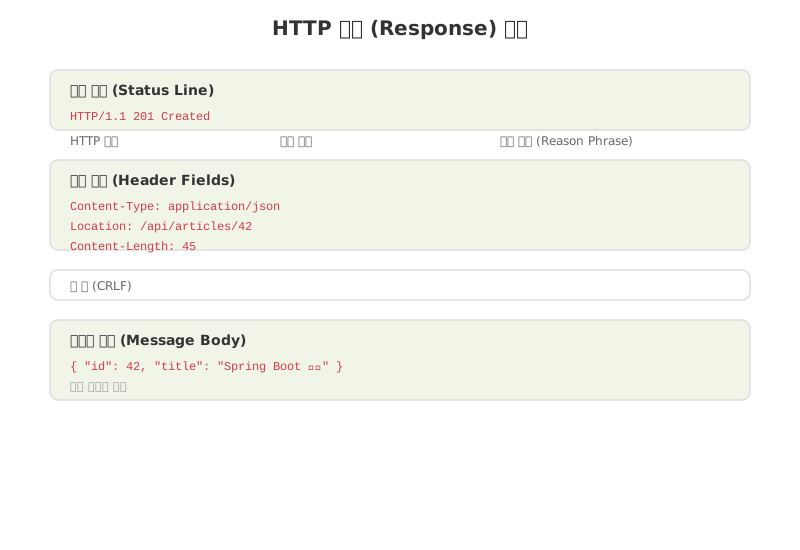
<h3 id="응답-메시지-response">응답 메시지 (Response)</h3>

<p><img src="/assets/images/network/post3-http-dns-uri/http-response.svg" alt="HTTP 응답 메시지 구조" style="max-width: 100%;" /></p>

<h3 id="http-상태-코드">HTTP 상태 코드</h3>

<table>
  <thead>
    <tr>
      <th>분류</th>
      <th>범위</th>
      <th>의미</th>
    </tr>
  </thead>
  <tbody>
    <tr>
      <td>1xx</td>
      <td>100~199</td>
      <td>정보 (요청 처리 중)</td>
    </tr>
    <tr>
      <td>2xx</td>
      <td>200~299</td>
      <td>성공</td>
    </tr>
    <tr>
      <td>3xx</td>
      <td>300~399</td>
      <td>리다이렉션</td>
    </tr>
    <tr>
      <td>4xx</td>
      <td>400~499</td>
      <td>클라이언트 오류</td>
    </tr>
    <tr>
      <td>5xx</td>
      <td>500~599</td>
      <td>서버 오류</td>
    </tr>
  </tbody>
</table>

<p><strong>자주 쓰이는 상태 코드 — Spring Boot REST API에서 사용</strong></p>

<table>
  <thead>
    <tr>
      <th>코드</th>
      <th>이름</th>
      <th>사용 시점</th>
    </tr>
  </thead>
  <tbody>
    <tr>
      <td><strong>200</strong> OK</td>
      <td>성공</td>
      <td>GET 성공, PUT 성공</td>
    </tr>
    <tr>
      <td><strong>201</strong> Created</td>
      <td>생성 성공</td>
      <td>POST 성공</td>
    </tr>
    <tr>
      <td><strong>204</strong> No Content</td>
      <td>응답 본문 없음</td>
      <td>DELETE 성공</td>
    </tr>
    <tr>
      <td><strong>301</strong> Moved Permanently</td>
      <td>영구 이동</td>
      <td>URL 변경</td>
    </tr>
    <tr>
      <td><strong>400</strong> Bad Request</td>
      <td>잘못된 요청</td>
      <td>유효성 검사 실패</td>
    </tr>
    <tr>
      <td><strong>401</strong> Unauthorized</td>
      <td>인증 실패</td>
      <td>로그인 필요</td>
    </tr>
    <tr>
      <td><strong>403</strong> Forbidden</td>
      <td>권한 없음</td>
      <td>접근 거부</td>
    </tr>
    <tr>
      <td><strong>404</strong> Not Found</td>
      <td>자원 없음</td>
      <td>없는 ID 조회</td>
    </tr>
    <tr>
      <td><strong>500</strong> Internal Server Error</td>
      <td>서버 오류</td>
      <td>예상치 못한 예외</td>
    </tr>
  </tbody>
</table>

<hr />

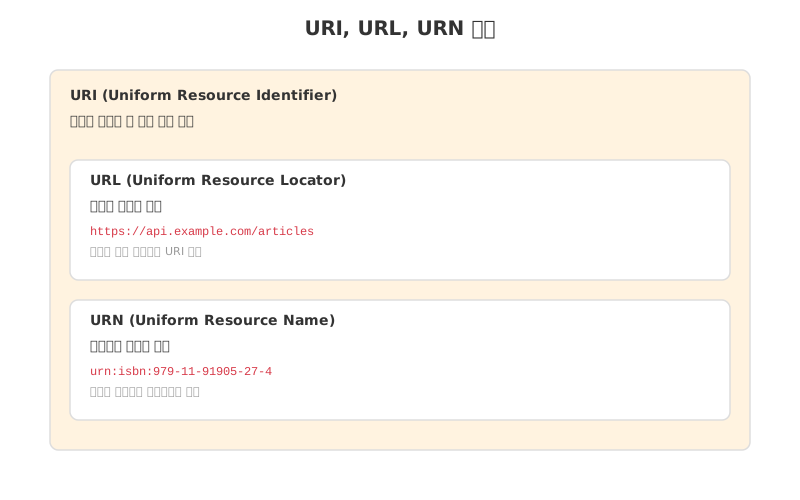
<h2 id="uri-url-urn">URI, URL, URN</h2>

<p><img src="/assets/images/network/post3-http-dns-uri/uri-url-urn.svg" alt="URI, URL, URN 관계" style="max-width: 100%;" /></p>

<h3 id="url-구조-분해">URL 구조 분해</h3>

<table>
  <thead>
    <tr>
      <th>구성 요소</th>
      <th>예시</th>
      <th>설명</th>
    </tr>
  </thead>
  <tbody>
    <tr>
      <td>scheme</td>
      <td><code class="language-plaintext highlighter-rouge">https</code></td>
      <td>프로토콜 지정</td>
    </tr>
    <tr>
      <td>authority</td>
      <td><code class="language-plaintext highlighter-rouge">api.example.com</code></td>
      <td>호스트명 (도메인 또는 IP)</td>
    </tr>
    <tr>
      <td>port</td>
      <td><code class="language-plaintext highlighter-rouge">:8080</code></td>
      <td>생략 시 scheme 기본 포트 (http=80, https=443)</td>
    </tr>
    <tr>
      <td>path</td>
      <td><code class="language-plaintext highlighter-rouge">/articles</code></td>
      <td>자원 경로</td>
    </tr>
    <tr>
      <td>query</td>
      <td><code class="language-plaintext highlighter-rouge">?category=spring&amp;page=1</code></td>
      <td>key=value 형태, <code class="language-plaintext highlighter-rouge">&amp;</code>로 구분</td>
    </tr>
    <tr>
      <td>fragment</td>
      <td><code class="language-plaintext highlighter-rouge">#section2</code></td>
      <td>HTML 특정 위치 이동 (서버로 전달 안 됨)</td>
    </tr>
  </tbody>
</table>

<hr />

<h2 id="dns-domain-name-system">DNS (Domain Name System)</h2>

<p>IP 주소만으로 서버를 기억하기 어려워서, <strong>도메인 이름 → IP 주소</strong> 로 변환합니다.</p>

<p><strong>주요 TLD 종류</strong></p>

<table>
  <thead>
    <tr>
      <th>TLD</th>
      <th>의미</th>
    </tr>
  </thead>
  <tbody>
    <tr>
      <td>.com</td>
      <td>상업적 목적 (일반)</td>
    </tr>
    <tr>
      <td>.net</td>
      <td>네트워크 관련</td>
    </tr>
    <tr>
      <td>.org</td>
      <td>비영리 기관</td>
    </tr>
    <tr>
      <td>.kr</td>
      <td>한국 ccTLD</td>
    </tr>
    <tr>
      <td>.io</td>
      <td>개발자/스타트업 선호</td>
    </tr>
  </tbody>
</table>

<h2 id="dns-캐시와-ttl">DNS 캐시와 TTL**</h2>

<table>
  <thead>
    <tr>
      <th>항목</th>
      <th>설명</th>
    </tr>
  </thead>
  <tbody>
    <tr>
      <td>DNS 캐시</td>
      <td>조회 결과를 TTL 동안 임시 저장</td>
    </tr>
    <tr>
      <td>TTL</td>
      <td>캐시 유효 시간 (짧으면 빠른 반영, 길면 부하 감소)</td>
    </tr>
    <tr>
      <td>효과</td>
      <td>루트 네임서버 과부하 방지, 조회 속도 향상</td>
    </tr>
  </tbody>
</table>

<h2 id="icmp-internet-control-message-protocol">ICMP (Internet Control Message Protocol)</h2>

<p>IP 패킷 전달 과정의 <strong>오류 메시지와 진단 정보</strong>를 전달합니다.
데이터 전송용이 아닌 네트워크 상태 확인용 보조 프로토콜입니다.</p>

<table>
  <thead>
    <tr>
      <th>ICMP 메시지 타입</th>
      <th>의미</th>
      <th>활용 도구</th>
    </tr>
  </thead>
  <tbody>
    <tr>
      <td>Echo Request / Reply</td>
      <td>호스트 도달 여부 확인</td>
      <td><code class="language-plaintext highlighter-rouge">ping</code></td>
    </tr>
    <tr>
      <td>Time Exceeded</td>
      <td>TTL 만료로 패킷 폐기</td>
      <td><code class="language-plaintext highlighter-rouge">traceroute</code></td>
    </tr>
    <tr>
      <td>Destination Unreachable</td>
      <td>목적지 도달 불가</td>
      <td>오류 진단</td>
    </tr>
    <tr>
      <td>Redirect</td>
      <td>더 나은 경로 안내</td>
      <td>라우터 경로 최적화</td>
    </tr>
  </tbody>
</table>

<hr />

<p><strong>API 설계와 HTTP 상태 코드 매핑 예시</strong></p>

<table>
  <thead>
    <tr>
      <th>API</th>
      <th>메서드</th>
      <th>성공 응답 코드</th>
      <th>실패 응답 코드</th>
    </tr>
  </thead>
  <tbody>
    <tr>
      <td>글 목록 조회</td>
      <td>GET</td>
      <td>200 OK</td>
      <td>500 Internal Server Error</td>
    </tr>
    <tr>
      <td>글 단건 조회</td>
      <td>GET</td>
      <td>200 OK</td>
      <td>404 Not Found</td>
    </tr>
    <tr>
      <td>글 등록</td>
      <td>POST</td>
      <td>201 Created</td>
      <td>400 Bad Request</td>
    </tr>
    <tr>
      <td>글 수정</td>
      <td>PUT</td>
      <td>200 OK</td>
      <td>404 Not Found</td>
    </tr>
    <tr>
      <td>글 삭제</td>
      <td>DELETE</td>
      <td>204 No Content</td>
      <td>404 Not Found</td>
    </tr>
  </tbody>
</table>

<h2 id="정리">정리</h2>

<table>
  <thead>
    <tr>
      <th>개념</th>
      <th>핵심</th>
    </tr>
  </thead>
  <tbody>
    <tr>
      <td>HTTP</td>
      <td>요청-응답, 미디어 독립, <strong>Stateless</strong>, Keep-Alive</td>
    </tr>
    <tr>
      <td>HTTP 메서드</td>
      <td>GET/POST/PUT/PATCH/DELETE</td>
    </tr>
    <tr>
      <td>URI / URL</td>
      <td>scheme + authority + port + path + query + fragment</td>
    </tr>
    <tr>
      <td>DNS</td>
      <td>도메인 → IP, 계층적 조회 후 캐시 저장</td>
    </tr>
    <tr>
      <td>ICMP</td>
      <td>네트워크 진단 프로토콜</td>
    </tr>
  </tbody>
</table>]]></content><author><name>yeedawon</name></author><category term="network" /><category term="network" /><category term="http" /><category term="dns" /><category term="uri" /><category term="rest" /><category term="aws" /><summary type="html"><![CDATA[사용자와 가장 가까운 응용 계층. HTTP 요청/응답 구조, 상태 코드, DNS 조회 흐름, URI 구조를 표와 다이어그램으로 정리합니다.]]></summary></entry><entry><title type="html">[Network] 전송 계층 — TCP, UDP, 3-way Handshake, 흐름·혼잡 제어</title><link href="https://yeedawon.github.io/network/2026/02/15/network-02-tcp-udp/" rel="alternate" type="text/html" title="[Network] 전송 계층 — TCP, UDP, 3-way Handshake, 흐름·혼잡 제어" /><published>2026-02-15T00:00:00+00:00</published><updated>2026-02-15T00:00:00+00:00</updated><id>https://yeedawon.github.io/network/2026/02/15/network-02-tcp-udp</id><content type="html" xml:base="https://yeedawon.github.io/network/2026/02/15/network-02-tcp-udp/"><![CDATA[<div class="callout callout-src">
  <div class="callout-title">📚 참조</div>
  ① 혼자 공부하는 네트워크 복습 노트<br />
  ② 강의 1편: <a href="https://youtu.be/c_4x5M_GwD8?si=Mh525VtBjlHnpTYI" target="_blank">youtu.be/c_4x5M_GwD8</a> &nbsp;
  ③ 강의 2편: <a href="https://youtu.be/k7G1wXTB8Fk?si=UhoHYeayG7C_xnFK" target="_blank">youtu.be/k7G1wXTB8Fk</a>
</div>

<h2 id="전송-계층의-역할">전송 계층의 역할</h2>

<p>네트워크 계층(IP)이 <strong>호스트 간</strong> 통신을 담당한다면,
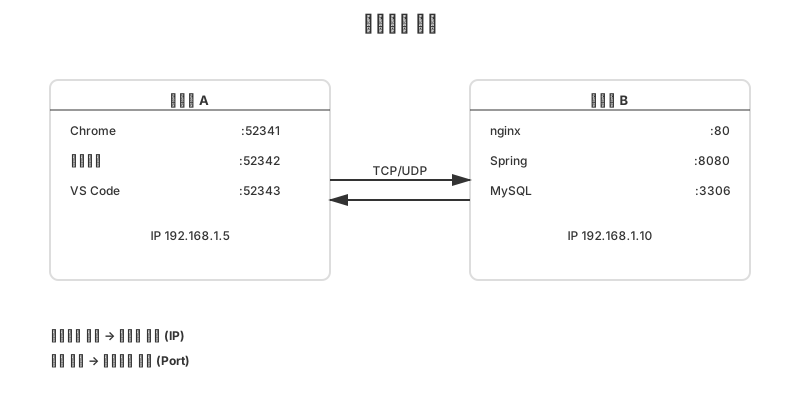
전송 계층은 <strong>호스트 내 특정 애플리케이션 프로세스</strong>까지 데이터를 전달합니다.</p>

<p><img src="/assets/images/network/post2-tcp-udp/1-host-port.svg" alt="호스트와 포트 구조" style="max-width: 100%;" /></p>

<hr />

<h2 id="포트-port">포트 (Port)</h2>

<p><strong>포트</strong>: 같은 호스트 내에서 여러 애플리케이션을 구분하는 번호 (16 bit, 0 ~ 65,535)</p>

<table>
  <thead>
    <tr>
      <th>범위</th>
      <th>구분</th>
      <th>예시</th>
    </tr>
  </thead>
  <tbody>
    <tr>
      <td>0 ~ 1,023</td>
      <td>잘 알려진 포트 (Well-Known)</td>
      <td>HTTP:80, HTTPS:443, SSH:22</td>
    </tr>
    <tr>
      <td>1,024 ~ 49,151</td>
      <td>등록된 포트 (Registered)</td>
      <td>MySQL:3306, Spring Boot:8080</td>
    </tr>
    <tr>
      <td>49,152 ~ 65,535</td>
      <td>동적 포트 (Ephemeral)</td>
      <td>클라이언트 측 임시 포트</td>
    </tr>
  </tbody>
</table>

<p><strong>주요 포트 번호 — AWS / 백엔드 필수</strong></p>

<table>
  <thead>
    <tr>
      <th>포트</th>
      <th>프로토콜</th>
      <th>설명</th>
    </tr>
  </thead>
  <tbody>
    <tr>
      <td>22</td>
      <td>SSH</td>
      <td>EC2 원격 접속</td>
    </tr>
    <tr>
      <td>80</td>
      <td>HTTP</td>
      <td>웹 서버</td>
    </tr>
    <tr>
      <td>443</td>
      <td>HTTPS</td>
      <td>보안 웹 서버</td>
    </tr>
    <tr>
      <td>3306</td>
      <td>MySQL</td>
      <td>RDS 데이터베이스</td>
    </tr>
    <tr>
      <td>8080</td>
      <td>HTTP-alt</td>
      <td>Spring Boot 기본 포트</td>
    </tr>
    <tr>
      <td>53</td>
      <td>DNS</td>
      <td>도메인 이름 조회</td>
    </tr>
    <tr>
      <td>67/68</td>
      <td>DHCP</td>
      <td>IP 자동 할당</td>
    </tr>
  </tbody>
</table>

<hr />

<h2 id="tcp-vs-udp">TCP vs UDP</h2>

<table>
  <thead>
    <tr>
      <th>항목</th>
      <th>TCP</th>
      <th>UDP</th>
    </tr>
  </thead>
  <tbody>
    <tr>
      <td>연결 방식</td>
      <td>연결형 (3-way handshake 후 통신)</td>
      <td>비연결형 (바로 전송)</td>
    </tr>
    <tr>
      <td>신뢰성</td>
      <td>높음 (순서 보장 + 재전송)</td>
      <td>낮음 (유실 시 재전송 없음)</td>
    </tr>
    <tr>
      <td>속도</td>
      <td>상대적으로 느림</td>
      <td>빠름</td>
    </tr>
    <tr>
      <td>헤더 크기</td>
      <td>20 ~ 60 byte</td>
      <td>8 byte (고정)</td>
    </tr>
    <tr>
      <td>흐름/혼잡 제어</td>
      <td>있음</td>
      <td>없음</td>
    </tr>
    <tr>
      <td>사용 예</td>
      <td>HTTP, HTTPS, FTP, SSH, DB</td>
      <td>DNS, DHCP, 동영상 스트리밍, 온라인 게임</td>
    </tr>
  </tbody>
</table>

<hr />

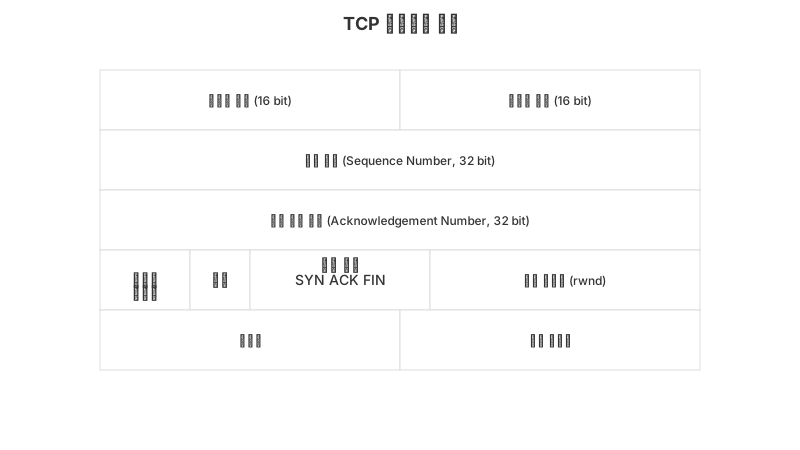
<h2 id="tcp-세그먼트-헤더">TCP 세그먼트 헤더</h2>

<p><img src="/assets/images/network/post2-tcp-udp/2-tcp-header.svg" alt="TCP 세그먼트 헤더 구조" style="max-width: 100%;" /></p>

<p><strong>주요 제어 비트(플래그)</strong></p>

<table>
  <thead>
    <tr>
      <th>비트</th>
      <th>이름</th>
      <th>의미</th>
    </tr>
  </thead>
  <tbody>
    <tr>
      <td>SYN</td>
      <td>Synchronize</td>
      <td>연결 수립 요청</td>
    </tr>
    <tr>
      <td>ACK</td>
      <td>Acknowledgement</td>
      <td>수신 확인</td>
    </tr>
    <tr>
      <td>FIN</td>
      <td>Finish</td>
      <td>연결 종료 요청</td>
    </tr>
    <tr>
      <td>RST</td>
      <td>Reset</td>
      <td>연결 강제 초기화</td>
    </tr>
    <tr>
      <td>PSH</td>
      <td>Push</td>
      <td>버퍼링 없이 즉시 전달</td>
    </tr>
  </tbody>
</table>

<hr />

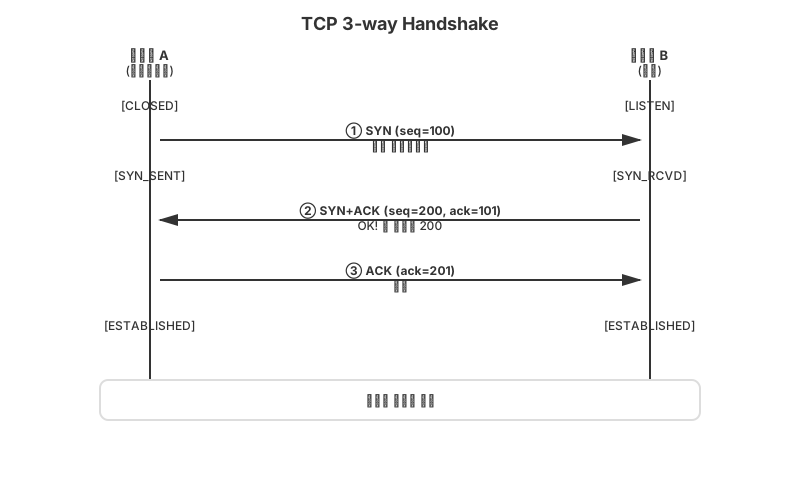
<h2 id="연결-수립--3-way-handshake">연결 수립 — 3-way Handshake</h2>

<p><img src="/assets/images/network/post2-tcp-udp/3-handshake-3way.svg" alt="3-way Handshake" style="max-width: 100%;" /></p>

<hr />

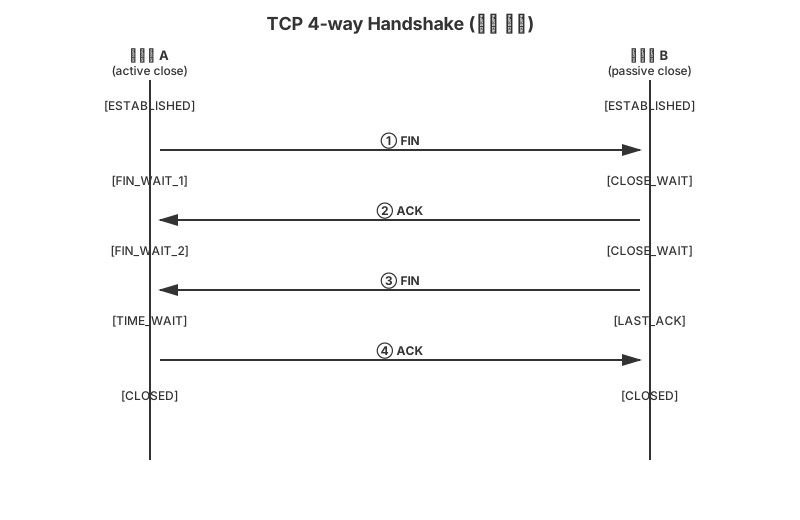
<h2 id="연결-종료--4-way-handshake">연결 종료 — 4-way Handshake</h2>

<p><img src="/assets/images/network/post2-tcp-udp/4-handshake-4way.svg" alt="4-way Handshake" style="max-width: 100%;" /></p>

<blockquote>
  <p><strong>TIME_WAIT</strong>: A가 보낸 마지막 ACK가 유실되었을 때 B의 FIN 재전송을 받을 수 있도록 잠시 대기합니다.</p>
</blockquote>

<hr />

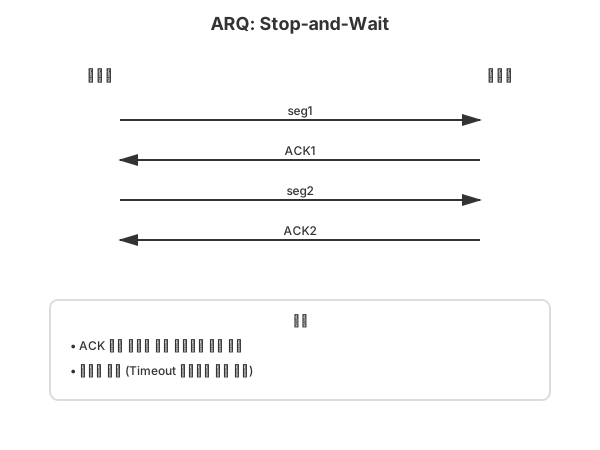
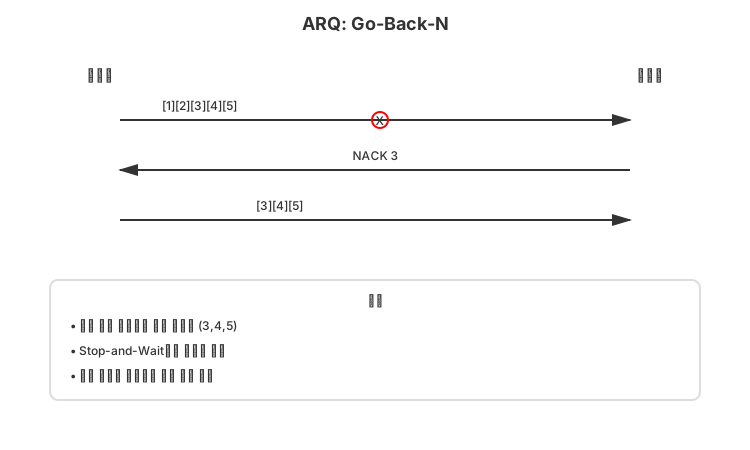
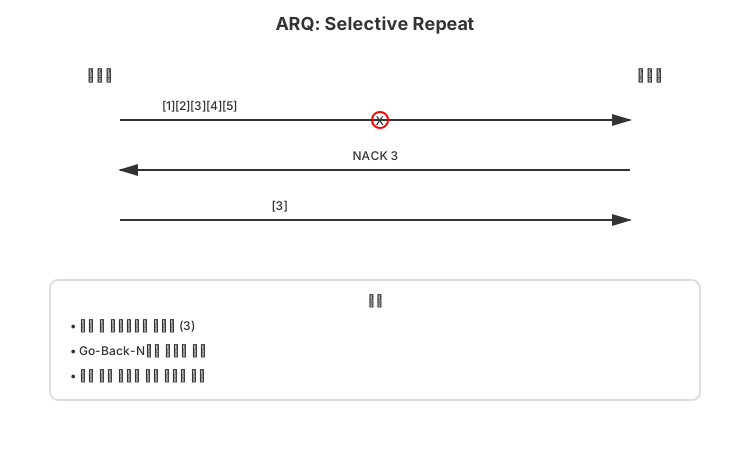
<h2 id="오류-제어--arq-방식-비교">오류 제어 — ARQ 방식 비교</h2>

<p><strong>ARQ (Automatic Repeat reQuest)</strong>: 오류 감지 시 자동으로 재전송하는 메커니즘</p>

<h3 id="stop-and-wait-arq">Stop-and-Wait ARQ</h3>

<p><img src="/assets/images/network/post2-tcp-udp/5-arq-stop-wait.svg" alt="Stop-and-Wait ARQ" style="max-width: 100%;" /></p>

<table>
  <thead>
    <tr>
      <th>장점</th>
      <th>단점</th>
    </tr>
  </thead>
  <tbody>
    <tr>
      <td>구현 단순, 신뢰성 높음</td>
      <td>네트워크 자원 낭비, 처리량 낮음</td>
    </tr>
  </tbody>
</table>

<h3 id="go-back-n-arq-파이프라이닝">Go-Back-N ARQ (파이프라이닝)</h3>

<p><img src="/assets/images/network/post2-tcp-udp/6-arq-gobackn.svg" alt="Go-Back-N ARQ" style="max-width: 100%;" /></p>

<table>
  <thead>
    <tr>
      <th>장점</th>
      <th>단점</th>
    </tr>
  </thead>
  <tbody>
    <tr>
      <td>Stop-and-Wait보다 처리량 높음</td>
      <td>오류 없는 세그먼트도 재전송</td>
    </tr>
  </tbody>
</table>

<h3 id="selective-repeat-arq">Selective Repeat ARQ</h3>

<p><img src="/assets/images/network/post2-tcp-udp/7-arq-selective.svg" alt="Selective Repeat ARQ" style="max-width: 100%;" /></p>

<table>
  <thead>
    <tr>
      <th>장점</th>
      <th>단점</th>
    </tr>
  </thead>
  <tbody>
    <tr>
      <td>불필요한 재전송 없음, 효율 최고</td>
      <td>수신 버퍼 관리 복잡</td>
    </tr>
  </tbody>
</table>

<hr />

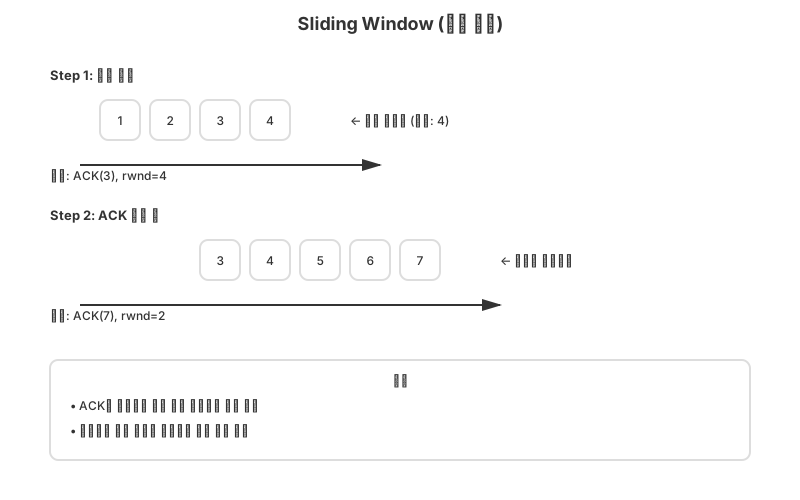
<h2 id="흐름-제어--슬라이딩-윈도우">흐름 제어 — 슬라이딩 윈도우</h2>

<p>수신자가 처리할 수 있는 데이터량을 <strong>수신 윈도우(rwnd)</strong> 로 알려주면,
송신자는 ACK 없이 그 크기만큼 연속으로 보낼 수 있습니다.</p>

<p><img src="/assets/images/network/post2-tcp-udp/8-sliding-window.svg" alt="슬라이딩 윈도우" style="max-width: 100%;" /></p>

<p>수신자 버퍼가 가득 찰수록 <code class="language-plaintext highlighter-rouge">rwnd</code> 값이 줄어들고, 비면 다시 늘어납니다.</p>

<hr />

<h2 id="혼잡-제어">혼잡 제어</h2>

<p>네트워크 자체의 혼잡(패킷 손실·지연)을 막기 위해 <strong>송신량을 조절</strong>합니다.</p>

<p><strong>혼잡 감지 신호</strong></p>

<table>
  <thead>
    <tr>
      <th>신호</th>
      <th>의미</th>
      <th>대응</th>
    </tr>
  </thead>
  <tbody>
    <tr>
      <td>ACK 3번 중복 수신</td>
      <td>특정 세그먼트 손실 (경미한 혼잡)</td>
      <td>빠른 재전송 (Fast Retransmit)</td>
    </tr>
    <tr>
      <td>타임아웃 발생</td>
      <td>심각한 혼잡</td>
      <td>혼잡 윈도우 1로 리셋</td>
    </tr>
  </tbody>
</table>

<h3 id="슬로-스타트--aimd-흐름">슬로 스타트 + AIMD 흐름</h3>

<p><img src="/assets/images/network/post2-tcp-udp/9-slow-start.svg" alt="슬로 스타트 + AIMD" style="max-width: 100%;" /></p>

<p><strong>혼잡 제어 상태 전환 요약</strong></p>

<table>
  <thead>
    <tr>
      <th>현재 상태</th>
      <th>이벤트</th>
      <th>다음 상태</th>
    </tr>
  </thead>
  <tbody>
    <tr>
      <td>슬로 스타트</td>
      <td>cwnd &lt; ssthresh</td>
      <td>cwnd × 2 (지수 증가)</td>
    </tr>
    <tr>
      <td>슬로 스타트</td>
      <td>cwnd ≥ ssthresh</td>
      <td>혼잡 회피(선형 증가)로 전환</td>
    </tr>
    <tr>
      <td>혼잡 회피</td>
      <td>ACK 3중 중복</td>
      <td>ssthresh = cwnd/2, 빠른 복구</td>
    </tr>
    <tr>
      <td>혼잡 회피</td>
      <td>타임아웃</td>
      <td>cwnd = 1, ssthresh = cwnd/2, 슬로 스타트 재시작</td>
    </tr>
  </tbody>
</table>

<hr />

<h2 id="aws--spring-boot에서-tcp-적용">AWS / Spring Boot에서 TCP 적용</h2>

<table>
  <thead>
    <tr>
      <th>개념</th>
      <th>실제 적용</th>
    </tr>
  </thead>
  <tbody>
    <tr>
      <td>포트 22</td>
      <td>EC2 SSH 접속 시 보안 그룹 인바운드 허용 필요</td>
    </tr>
    <tr>
      <td>포트 8080</td>
      <td>Spring Boot 앱 배포 시 보안 그룹 개방</td>
    </tr>
    <tr>
      <td>포트 3306</td>
      <td>RDS MySQL 연결 (프라이빗 서브넷 내부만 허용)</td>
    </tr>
    <tr>
      <td>3-way Handshake</td>
      <td>HTTP 요청마다 TCP 연결 수립 (HTTP/1.1 keep-alive로 재사용)</td>
    </tr>
    <tr>
      <td>4-way Handshake</td>
      <td>연결 종료, TIME_WAIT은 서버 성능에 영향 가능</td>
    </tr>
    <tr>
      <td>ALB (로드밸런서)</td>
      <td>클라이언트↔ALB, ALB↔EC2 각각 독립된 TCP 연결</td>
    </tr>
  </tbody>
</table>

<h2 id="정리">정리</h2>

<table>
  <thead>
    <tr>
      <th>개념</th>
      <th>핵심</th>
    </tr>
  </thead>
  <tbody>
    <tr>
      <td>포트</td>
      <td>호스트 내 프로세스 식별 (IP + 포트 = 소켓)</td>
    </tr>
    <tr>
      <td>TCP</td>
      <td>연결형, 신뢰성, 오류·흐름·혼잡 제어</td>
    </tr>
    <tr>
      <td>UDP</td>
      <td>비연결형, 빠름, 단순</td>
    </tr>
    <tr>
      <td>3-way Handshake</td>
      <td>SYN → SYN+ACK → ACK</td>
    </tr>
    <tr>
      <td>슬라이딩 윈도우</td>
      <td>흐름 제어, 수신 버퍼 크기만큼 연속 전송</td>
    </tr>
    <tr>
      <td>슬로 스타트 + AIMD</td>
      <td>혼잡 제어 기본 알고리즘</td>
    </tr>
  </tbody>
</table>

<p>다음 포스트: <strong>응용 계층 — HTTP, DNS, URI</strong></p>]]></content><author><name>yeedawon</name></author><category term="network" /><category term="network" /><category term="tcp" /><category term="udp" /><category term="handshake" /><category term="flow-control" /><category term="congestion-control" /><summary type="html"><![CDATA[포트 번호로 프로세스를 구분하고, TCP의 신뢰성 보장 메커니즘(오류·흐름·혼잡 제어)과 3-way Handshake를 다이어그램으로 정리합니다.]]></summary></entry><entry><title type="html">[Network] 네트워크 계층 — IP 주소, 서브네팅, 라우팅, NAT, DHCP</title><link href="https://yeedawon.github.io/network/2026/02/11/network-01-ip-routing-nat/" rel="alternate" type="text/html" title="[Network] 네트워크 계층 — IP 주소, 서브네팅, 라우팅, NAT, DHCP" /><published>2026-02-11T00:00:00+00:00</published><updated>2026-02-11T00:00:00+00:00</updated><id>https://yeedawon.github.io/network/2026/02/11/network-01-ip-routing-nat</id><content type="html" xml:base="https://yeedawon.github.io/network/2026/02/11/network-01-ip-routing-nat/"><![CDATA[<div class="callout callout-src">
  <div class="callout-title">📚 참조</div>
  ① 혼자 공부하는 네트워크 복습 노트<br />
  ② 강의 1편: <a href="https://youtu.be/c_4x5M_GwD8?si=Mh525VtBjlHnpTYI" target="_blank">youtu.be/c_4x5M_GwD8</a> &nbsp;
  ③ 강의 2편: <a href="https://youtu.be/k7G1wXTB8Fk?si=UhoHYeayG7C_xnFK" target="_blank">youtu.be/k7G1wXTB8Fk</a>
</div>

<h2 id="왜-네트워크-계층이-필요한가">왜 네트워크 계층이 필요한가</h2>

<p>데이터 링크 계층(이더넷·스위치)은 <strong>같은 LAN 안에서만</strong> 통신할 수 있습니다.
인터넷처럼 서로 다른 네트워크 간 통신에는 <strong>네트워크 계층(IP)</strong> 이 필요합니다.</p>

<table>
  <thead>
    <tr>
      <th>계층</th>
      <th>주소 체계</th>
      <th>통신 범위</th>
      <th>장비</th>
    </tr>
  </thead>
  <tbody>
    <tr>
      <td>데이터 링크 계층</td>
      <td>MAC 주소 (48 bit)</td>
      <td>동일 LAN 내</td>
      <td>스위치</td>
    </tr>
    <tr>
      <td><strong>네트워크 계층</strong></td>
      <td><strong>IP 주소 (32 bit)</strong></td>
      <td><strong>다른 네트워크 간</strong></td>
      <td><strong>라우터</strong></td>
    </tr>
  </tbody>
</table>

<p><strong>네트워크 계층이 해결하는 세 가지 문제</strong></p>

<table>
  <thead>
    <tr>
      <th>문제</th>
      <th>해결 방법</th>
    </tr>
  </thead>
  <tbody>
    <tr>
      <td>다른 네트워크 호스트의 주소를 어떻게 지정?</td>
      <td>IP 주소 (Addressing)</td>
    </tr>
    <tr>
      <td>패킷이 어떤 경로로 가야 하나?</td>
      <td>라우팅 (Routing)</td>
    </tr>
    <tr>
      <td>링크 MTU보다 큰 패킷은?</td>
      <td>단편화 (Fragmentation)</td>
    </tr>
  </tbody>
</table>

<hr />

<h2 id="ipv4-주소-구조">IPv4 주소 구조</h2>

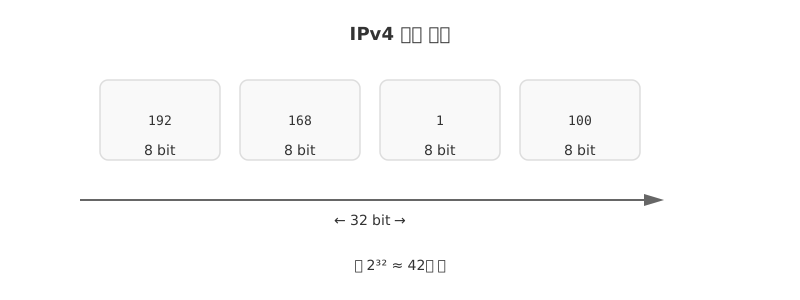
<p>IPv4는 <strong>32비트(4바이트)</strong> 주소 체계로, 8비트씩 4개의 옥텟(octet)으로 구분합니다.</p>

<p><img src="/assets/images/network/post1-ip-routing-nat/1-ipv4-structure.svg" alt="IPv4 주소 구조" style="max-width: 100%;" /></p>

<p>모든 IP 주소는 두 부분으로 구성됩니다.</p>

<table>
  <thead>
    <tr>
      <th>부분</th>
      <th>의미</th>
      <th>예시 (192.168.1.100/24)</th>
    </tr>
  </thead>
  <tbody>
    <tr>
      <td>네트워크 주소</td>
      <td>어느 네트워크에 속하는가</td>
      <td>192.168.1</td>
    </tr>
    <tr>
      <td>호스트 주소</td>
      <td>해당 네트워크 안의 몇 번 호스트?</td>
      <td>100</td>
    </tr>
  </tbody>
</table>

<p><strong>특수 주소 규칙</strong></p>

<table>
  <thead>
    <tr>
      <th>호스트 주소 비트</th>
      <th>의미</th>
      <th>예시 (/24)</th>
    </tr>
  </thead>
  <tbody>
    <tr>
      <td>모두 <strong>0</strong></td>
      <td>네트워크 주소 (네트워크 자체를 표현)</td>
      <td>192.168.1.<strong>0</strong></td>
    </tr>
    <tr>
      <td>모두 <strong>1</strong></td>
      <td>브로드캐스트 주소 (전체 전송)</td>
      <td>192.168.1.<strong>255</strong></td>
    </tr>
    <tr>
      <td>나머지</td>
      <td>실제 호스트에 할당 가능</td>
      <td>192.168.1.1 ~ .254</td>
    </tr>
  </tbody>
</table>

<hr />

<h2 id="classful-vs-cidr">Classful vs CIDR</h2>

<h3 id="classful-주소-체계-과거">Classful 주소 체계 (과거)</h3>

<p>초기 인터넷은 IP 대역을 클래스로 나눠 할당했습니다.</p>

<table>
  <thead>
    <tr>
      <th>클래스</th>
      <th>시작 비트</th>
      <th>네트워크 비트</th>
      <th>호스트 비트</th>
      <th>대역</th>
    </tr>
  </thead>
  <tbody>
    <tr>
      <td>A</td>
      <td>0…</td>
      <td>8</td>
      <td>24</td>
      <td>0.x.x.x ~ 127.x.x.x</td>
    </tr>
    <tr>
      <td>B</td>
      <td>10…</td>
      <td>16</td>
      <td>16</td>
      <td>128.x.x.x ~ 191.x.x.x</td>
    </tr>
    <tr>
      <td>C</td>
      <td>110…</td>
      <td>24</td>
      <td>8</td>
      <td>192.x.x.x ~ 223.x.x.x</td>
    </tr>
  </tbody>
</table>

<blockquote>
  <p><strong>문제점</strong>: 호스트 300개가 필요한 기업에 클래스 B(65,534개)를 통째로 줘야 해서 IP 낭비가 극심했습니다.</p>
</blockquote>

<h3 id="cidr-classless-inter-domain-routing--현재-표준">CIDR (Classless Inter-Domain Routing) — 현재 표준</h3>

<p>클래스 경계 없이 <strong>슬래시(/) 표기</strong>로 네트워크 크기를 자유롭게 지정합니다.</p>

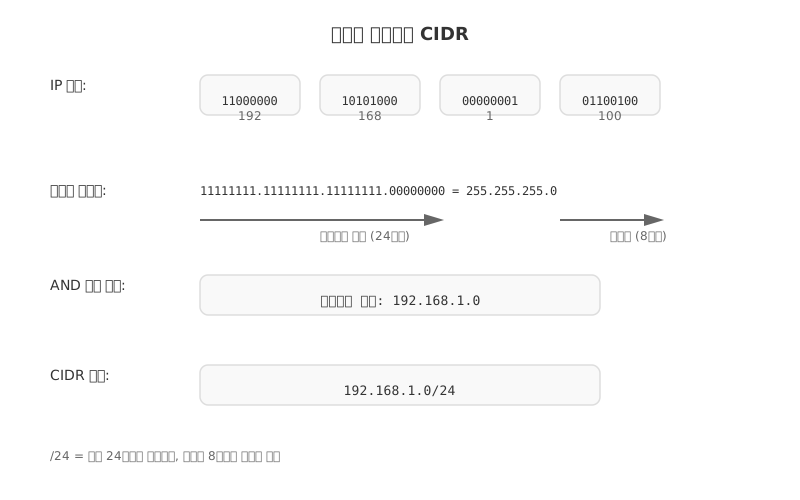
<p><strong>서브넷 마스크 — 핵심 개념</strong></p>

<p><img src="/assets/images/network/post1-ip-routing-nat/2-subnet-mask.svg" alt="서브넷 마스크 개념" style="max-width: 100%;" /></p>

<p><strong>CIDR 표기 별 호스트 수 계산</strong></p>

<table>
  <thead>
    <tr>
      <th>CIDR 표기</th>
      <th>서브넷 마스크</th>
      <th>호스트 수</th>
      <th>AWS 활용</th>
    </tr>
  </thead>
  <tbody>
    <tr>
      <td>/8</td>
      <td>255.0.0.0</td>
      <td>16,777,214</td>
      <td>대규모 VPC</td>
    </tr>
    <tr>
      <td>/16</td>
      <td>255.255.0.0</td>
      <td>65,534</td>
      <td>VPC 전체 대역</td>
    </tr>
    <tr>
      <td>/24</td>
      <td>255.255.255.0</td>
      <td>254</td>
      <td>서브넷 하나</td>
    </tr>
    <tr>
      <td>/28</td>
      <td>255.255.255.240</td>
      <td>14</td>
      <td>소규모 서브넷</td>
    </tr>
  </tbody>
</table>

<blockquote>
  <p>공식: 호스트 수 = <strong>2^(32 - prefix) - 2</strong>  (네트워크·브로드캐스트 주소 제외)</p>
</blockquote>

<hr />

<h2 id="공인-ip-vs-사설-ip">공인 IP vs 사설 IP</h2>

<table>
  <thead>
    <tr>
      <th>구분</th>
      <th>설명</th>
      <th>할당</th>
    </tr>
  </thead>
  <tbody>
    <tr>
      <td>공인 IP</td>
      <td>인터넷에서 전 세계 유일</td>
      <td>ISP(통신사)가 할당</td>
    </tr>
    <tr>
      <td><strong>사설 IP</strong></td>
      <td>내부 네트워크 전용, 인터넷 직접 통신 불가</td>
      <td>라우터(공유기)가 할당</td>
    </tr>
  </tbody>
</table>

<p><strong>RFC 1918 사설 IP 대역 — AWS VPC가 이 대역을 씁니다</strong></p>

<table>
  <thead>
    <tr>
      <th>대역</th>
      <th>범위</th>
      <th>비고</th>
    </tr>
  </thead>
  <tbody>
    <tr>
      <td><strong>10.0.0.0/8</strong></td>
      <td>10.0.0.0 ~ 10.255.255.255</td>
      <td>대규모 사설망, AWS VPC 권장</td>
    </tr>
    <tr>
      <td><strong>172.16.0.0/12</strong></td>
      <td>172.16.0.0 ~ 172.31.255.255</td>
      <td>중규모 사설망</td>
    </tr>
    <tr>
      <td><strong>192.168.0.0/16</strong></td>
      <td>192.168.0.0 ~ 192.168.255.255</td>
      <td>가정용 공유기 기본값</td>
    </tr>
    <tr>
      <td>127.0.0.0/8</td>
      <td>127.x.x.x</td>
      <td>루프백 (자기 자신)</td>
    </tr>
  </tbody>
</table>

<hr />

<h2 id="nat-network-address-translation">NAT (Network Address Translation)</h2>

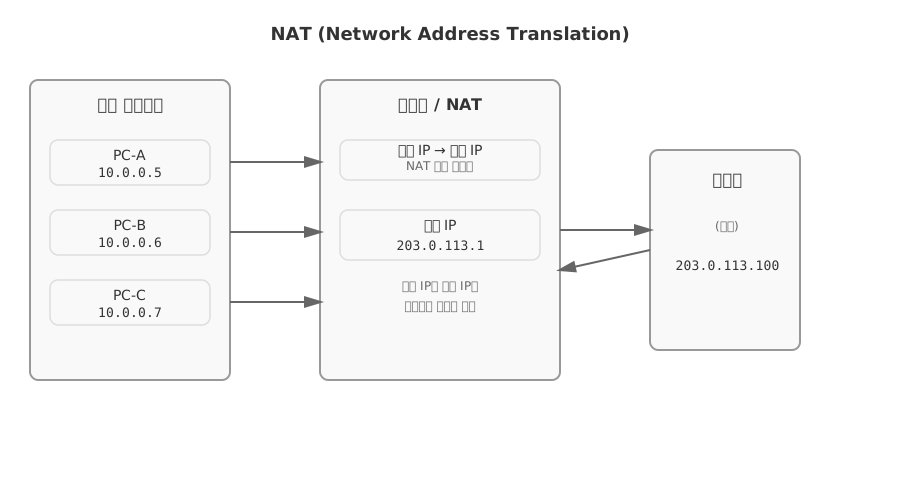
<p>사설 IP를 가진 내부 호스트가 <strong>인터넷과 통신</strong>할 때, 라우터(공유기)가 주소를 변환합니다.</p>

<p><img src="/assets/images/network/post1-ip-routing-nat/3-nat-diagram.svg" alt="NAT 변환 다이어그램" style="max-width: 100%;" /></p>

<p><strong>NAT 변환 테이블 예시</strong></p>

<table>
  <thead>
    <tr>
      <th>내부 IP</th>
      <th>내부 포트</th>
      <th>외부(공인) IP</th>
      <th>외부 포트</th>
    </tr>
  </thead>
  <tbody>
    <tr>
      <td>10.0.0.5</td>
      <td>45001</td>
      <td>203.0.113.1</td>
      <td>60001</td>
    </tr>
    <tr>
      <td>10.0.0.6</td>
      <td>45002</td>
      <td>203.0.113.1</td>
      <td>60002</td>
    </tr>
    <tr>
      <td>10.0.0.7</td>
      <td>45003</td>
      <td>203.0.113.1</td>
      <td>60003</td>
    </tr>
  </tbody>
</table>

<p><strong>NAPT</strong>: 하나의 공인 IP에 포트 번호를 다르게 부여해 여러 내부 호스트가 동시에 통신합니다.
가정 공유기, 기업 방화벽, <strong>AWS NAT Gateway</strong> 모두 이 방식입니다.</p>

<p><strong>포트 포워딩 개념</strong></p>

<table>
  <thead>
    <tr>
      <th>요청</th>
      <th>변환 결과</th>
    </tr>
  </thead>
  <tbody>
    <tr>
      <td>외부 → 공인IP:80</td>
      <td>→ 내부 192.168.1.10:8080</td>
    </tr>
    <tr>
      <td>외부 → 공인IP:22</td>
      <td>→ 내부 192.168.1.20:22</td>
    </tr>
  </tbody>
</table>

<hr />

<h2 id="라우팅-routing">라우팅 (Routing)</h2>

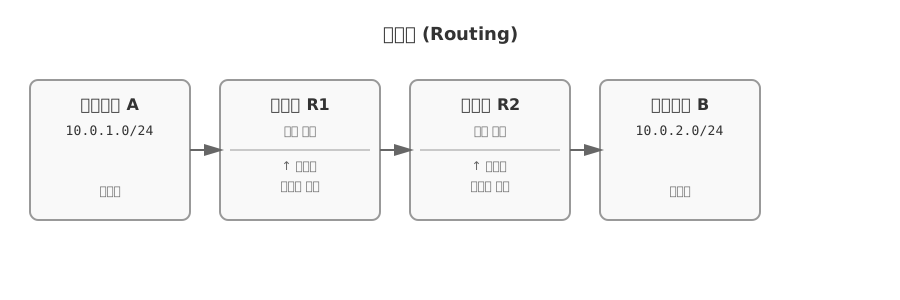
<p><strong>라우터</strong>: 서로 다른 네트워크를 연결하고, 패킷이 이동할 최적 경로를 결정하는 장비</p>

<p><img src="/assets/images/network/post1-ip-routing-nat/4-routing-diagram.svg" alt="라우팅 경로 다이어그램" style="max-width: 100%;" /></p>

<p><strong>라우팅 테이블 구조</strong></p>

<table>
  <thead>
    <tr>
      <th>수신지 네트워크</th>
      <th>서브넷 마스크</th>
      <th>Next Hop (다음 라우터)</th>
      <th>Metric</th>
    </tr>
  </thead>
  <tbody>
    <tr>
      <td>10.0.1.0</td>
      <td>/24</td>
      <td>10.0.0.1 (직접 연결)</td>
      <td>0</td>
    </tr>
    <tr>
      <td>192.168.0.0</td>
      <td>/16</td>
      <td>10.0.0.254</td>
      <td>1</td>
    </tr>
    <tr>
      <td>0.0.0.0</td>
      <td>/0 (Default)</td>
      <td>203.0.113.254 (ISP)</td>
      <td>10</td>
    </tr>
  </tbody>
</table>

<blockquote>
  <p><strong>Default Route</strong> (<code class="language-plaintext highlighter-rouge">0.0.0.0/0</code>): 테이블에 일치하는 경로가 없을 때 사용하는 기본 경로</p>
</blockquote>

<p><strong>라우팅 프로토콜 비교</strong></p>

<table>
  <thead>
    <tr>
      <th>구분</th>
      <th>프로토콜</th>
      <th>방식</th>
      <th>특징</th>
    </tr>
  </thead>
  <tbody>
    <tr>
      <td>내부(IGP)</td>
      <td><strong>RIP</strong></td>
      <td>거리 벡터</td>
      <td>홉 수 기준, 최대 15홉, 주기적 전체 업데이트</td>
    </tr>
    <tr>
      <td>내부(IGP)</td>
      <td><strong>OSPF</strong></td>
      <td>링크 상태</td>
      <td>변경 시만 업데이트, 대규모 네트워크 적합</td>
    </tr>
    <tr>
      <td>외부(EGP)</td>
      <td><strong>BGP</strong></td>
      <td>경로 벡터</td>
      <td>인터넷 백본 표준, AS 간 정책 기반 라우팅</td>
    </tr>
  </tbody>
</table>

<hr />

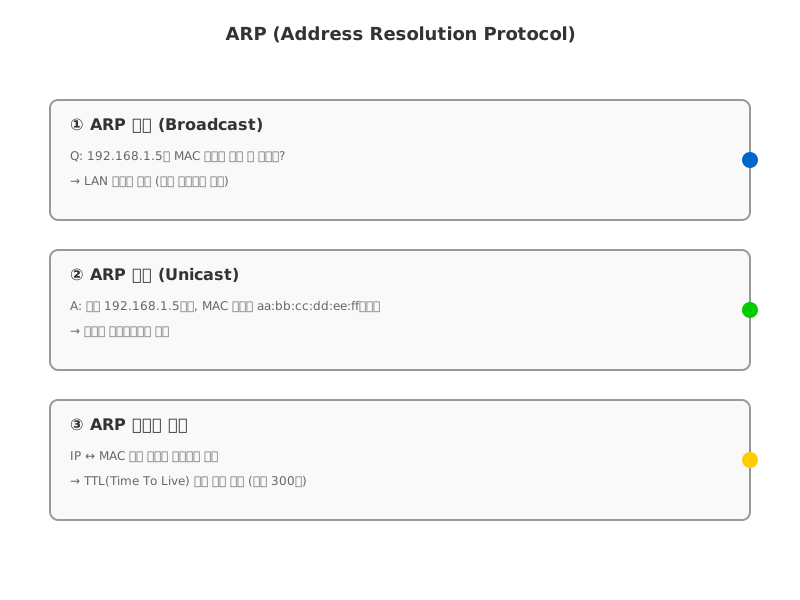
<h2 id="arp-address-resolution-protocol">ARP (Address Resolution Protocol)</h2>

<p>네트워크 계층과 데이터 링크 계층을 연결합니다.
<strong>IP 주소 → MAC 주소</strong> 변환이 목적입니다.</p>

<p><img src="/assets/images/network/post1-ip-routing-nat/5-arp-process.svg" alt="ARP 프로세스" style="max-width: 100%;" /></p>

<p><strong>ARP 테이블 예시</strong></p>

<table>
  <thead>
    <tr>
      <th>IP 주소</th>
      <th>MAC 주소</th>
      <th>타입</th>
    </tr>
  </thead>
  <tbody>
    <tr>
      <td>192.168.1.1</td>
      <td>00:11:22:33:44:55</td>
      <td>동적 (캐시)</td>
    </tr>
    <tr>
      <td>192.168.1.5</td>
      <td>aa:bb:cc:dd:ee:ff</td>
      <td>동적 (캐시)</td>
    </tr>
    <tr>
      <td>192.168.1.10</td>
      <td>ff:ee:dd:cc:bb:aa</td>
      <td>정적 (수동 설정)</td>
    </tr>
  </tbody>
</table>

<hr />

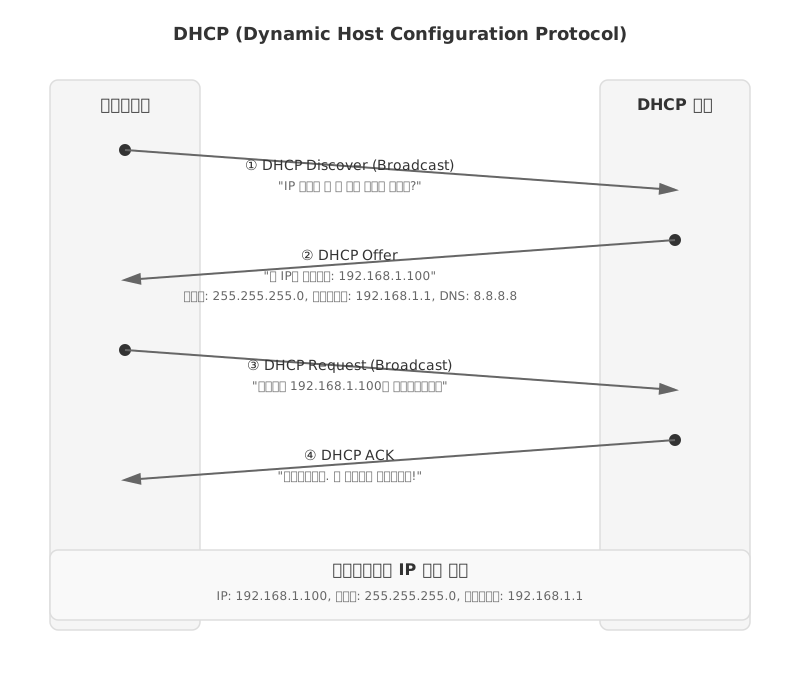
<h2 id="dhcp-dynamic-host-configuration-protocol">DHCP (Dynamic Host Configuration Protocol)</h2>

<p>클라이언트에게 <strong>IP 주소를 자동으로 할당</strong>합니다. (보통 라우터·공유기가 DHCP 서버 역할)</p>

<p><img src="/assets/images/network/post1-ip-routing-nat/6-dhcp-process.svg" alt="DHCP 프로세스" style="max-width: 100%;" /></p>

<p><strong>DHCP가 제공하는 정보</strong></p>

<table>
  <thead>
    <tr>
      <th>항목</th>
      <th>예시</th>
    </tr>
  </thead>
  <tbody>
    <tr>
      <td>IP 주소</td>
      <td>192.168.1.100</td>
    </tr>
    <tr>
      <td>서브넷 마스크</td>
      <td>255.255.255.0</td>
    </tr>
    <tr>
      <td>기본 게이트웨이</td>
      <td>192.168.1.1</td>
    </tr>
    <tr>
      <td>DNS 서버</td>
      <td>8.8.8.8</td>
    </tr>
    <tr>
      <td>임대 기간 (Lease Time)</td>
      <td>24시간</td>
    </tr>
  </tbody>
</table>

<hr />

<h2 id="ip-단편화-fragmentation">IP 단편화 (Fragmentation)</h2>

<p>전송 패킷이 링크의 <strong>MTU(최대 전송 단위)</strong>보다 크면 분할합니다.</p>

<table>
  <thead>
    <tr>
      <th>구분</th>
      <th>크기</th>
    </tr>
  </thead>
  <tbody>
    <tr>
      <td>일반 이더넷 MTU</td>
      <td><strong>1500 byte</strong></td>
    </tr>
    <tr>
      <td>IP 헤더</td>
      <td>20 byte</td>
    </tr>
    <tr>
      <td>최대 페이로드</td>
      <td>1480 byte</td>
    </tr>
  </tbody>
</table>

<p><strong>IPv4 헤더 중 단편화 관련 필드</strong></p>

<table>
  <thead>
    <tr>
      <th>필드</th>
      <th>역할</th>
    </tr>
  </thead>
  <tbody>
    <tr>
      <td>Identifier</td>
      <td>같은 원본 패킷 조각임을 식별하는 번호</td>
    </tr>
    <tr>
      <td>Flag – DF (Don’t Fragment)</td>
      <td>1이면 분할 금지 → 분할 필요 시 ICMP 오류 반환</td>
    </tr>
    <tr>
      <td>Flag – MF (More Fragments)</td>
      <td>1이면 뒤에 조각이 더 있음</td>
    </tr>
    <tr>
      <td>Fragment Offset</td>
      <td>원본에서 해당 조각이 시작하는 위치 (8바이트 단위)</td>
    </tr>
    <tr>
      <td>TTL (Time To Live)</td>
      <td>라우터 통과 시마다 -1, 0이 되면 패킷 폐기 (루프 방지)</td>
    </tr>
  </tbody>
</table>

<hr />

<h2 id="aws에서-네트워크-계층-개념-적용">AWS에서 네트워크 계층 개념 적용</h2>

<table>
  <thead>
    <tr>
      <th>개념</th>
      <th>AWS 서비스 / 기능</th>
    </tr>
  </thead>
  <tbody>
    <tr>
      <td>사설 IP 대역 (RFC 1918)</td>
      <td>VPC CIDR (10.0.0.0/16 등)</td>
    </tr>
    <tr>
      <td>서브네팅 (CIDR)</td>
      <td>퍼블릭 서브넷 /24, 프라이빗 서브넷 /24</td>
    </tr>
    <tr>
      <td>라우터</td>
      <td>VPC Router (자동 생성됨)</td>
    </tr>
    <tr>
      <td>라우팅 테이블</td>
      <td>Route Table (서브넷별 경로 설정)</td>
    </tr>
    <tr>
      <td>NAT</td>
      <td>NAT Gateway (프라이빗 서브넷 → 인터넷)</td>
    </tr>
    <tr>
      <td>DHCP</td>
      <td>VPC DHCP Options Set</td>
    </tr>
    <tr>
      <td>Default Route</td>
      <td>0.0.0.0/0 → Internet Gateway 또는 NAT Gateway</td>
    </tr>
  </tbody>
</table>

<p><strong>VPC 서브넷 설계 예시</strong></p>

<table>
  <thead>
    <tr>
      <th>서브넷</th>
      <th>CIDR</th>
      <th>용도</th>
      <th>인터넷 연결</th>
    </tr>
  </thead>
  <tbody>
    <tr>
      <td>Public Subnet</td>
      <td>10.0.1.0/24</td>
      <td>ALB, Bastion Host</td>
      <td>Internet Gateway (직접)</td>
    </tr>
    <tr>
      <td>Private Subnet</td>
      <td>10.0.2.0/24</td>
      <td>EC2 앱 서버, RDS</td>
      <td>NAT Gateway (간접)</td>
    </tr>
  </tbody>
</table>

<h2 id="정리">정리</h2>

<table>
  <thead>
    <tr>
      <th>개념</th>
      <th>핵심</th>
    </tr>
  </thead>
  <tbody>
    <tr>
      <td>IPv4</td>
      <td>32 bit, 네트워크 + 호스트 주소</td>
    </tr>
    <tr>
      <td>CIDR</td>
      <td><code class="language-plaintext highlighter-rouge">/숫자</code>로 서브넷 크기 표현, AWS VPC 필수 개념</td>
    </tr>
    <tr>
      <td>사설 IP</td>
      <td>10.x / 172.16-31.x / 192.168.x — 외부 직접 통신 불가</td>
    </tr>
    <tr>
      <td>NAT</td>
      <td>사설 IP ↔ 공인 IP 변환, AWS NAT Gateway 동일 원리</td>
    </tr>
    <tr>
      <td>DHCP</td>
      <td>IP 자동 할당 (Discover → Offer → Request → ACK)</td>
    </tr>
    <tr>
      <td>라우팅</td>
      <td>최적 경로 결정, 라우팅 테이블 참조</td>
    </tr>
    <tr>
      <td>ARP</td>
      <td>IP → MAC 주소 변환</td>
    </tr>
  </tbody>
</table>

<p>다음 포스트: <strong>전송 계층 — TCP, UDP, 3-way Handshake, 혼잡 제어</strong></p>]]></content><author><name>yeedawon</name></author><category term="network" /><category term="network" /><category term="ip" /><category term="routing" /><category term="nat" /><category term="dhcp" /><category term="subnetting" /><category term="aws" /><summary type="html"><![CDATA[LAN을 넘어 인터넷 통신을 담당하는 네트워크 계층의 핵심 개념. IP 주소 구조, 서브네팅, NAT, DHCP를 AWS VPC와 연결해 정리합니다.]]></summary></entry><entry><title type="html">[Network]게시글 소개</title><link href="https://yeedawon.github.io/network/2026/02/10/network-00-intro/" rel="alternate" type="text/html" title="[Network]게시글 소개" /><published>2026-02-10T00:00:00+00:00</published><updated>2026-02-10T00:00:00+00:00</updated><id>https://yeedawon.github.io/network/2026/02/10/network-00-intro</id><content type="html" xml:base="https://yeedawon.github.io/network/2026/02/10/network-00-intro/"><![CDATA[<div class="callout-title">📝 이 시리즈에 대하여</div>
<p>이 네트워크 시리즈는 <strong>「혼자 공부하는 네트워크」</strong> 교재와 관련 강의를 수강하며 작성한
  <strong>손필기 복습 노트</strong>를 원본 자료로 하여, <strong>생성형 AI</strong>를 활용해
  구조화·요약한 포스트입니다.<br /></p>

<h2 id="원본-자료">원본 자료</h2>

<p>이 시리즈의 바탕이 된 자료는 아래와 같습니다.</p>

<table>
  <thead>
    <tr>
      <th>구분</th>
      <th>내용</th>
    </tr>
  </thead>
  <tbody>
    <tr>
      <td>교재</td>
      <td>혼자 공부하는 네트워크 (한빛미디어)</td>
    </tr>
    <tr>
      <td>강의 ①</td>
      <td><a href="https://youtu.be/c_4x5M_GwD8?si=Mh525VtBjlHnpTYI" target="_blank">youtu.be/c_4x5M_GwD8</a></td>
    </tr>
    <tr>
      <td>강의 ②</td>
      <td><a href="https://youtu.be/k7G1wXTB8Fk?si=UhoHYeayG7C_xnFK" target="_blank">youtu.be/k7G1wXTB8Fk</a></td>
    </tr>
    <tr>
      <td>원본 노트</td>
      <td>수기 복습 노트 — <a href="/assets/files/network.pdf" download="">PDF 다운로드</a></td>
    </tr>
  </tbody>
</table>

<h2 id="이-블로그에-게시된-네트워크-관련-게시글은-원본-노트를-기반으로-하여-생성형-ai를-통해-제작되었습니다">이 블로그에 게시된 네트워크 관련 게시글은 <strong>원본 노트를 기반</strong>으로 하여 <strong>생성형 AI</strong>를 통해 제작되었습니다.</h2>

<hr />

<blockquote>
  <p>첫 번째 포스트: <strong><a href="/network/2026/01/22/network-01-ip-routing-nat/">네트워크 계층 — IP 주소, 서브네팅, 라우팅, NAT, DHCP →</a></strong></p>
</blockquote>]]></content><author><name>yeedawon</name></author><category term="network" /><category term="network" /><category term="study" /><category term="intro" /><summary type="html"><![CDATA[「혼자 공부하는 네트워크」 강의와 직접 필기한 노트를 기반으로, 생성형 AI를 활용해 정리한 네트워크 시리즈의 소개 글입니다.]]></summary></entry><entry><title type="html">[Signal Processing] Signal Processing First — Chapter 2: Sinusoids</title><link href="https://yeedawon.github.io/ai/2026/02/10/sp-01-signalcos/" rel="alternate" type="text/html" title="[Signal Processing] Signal Processing First — Chapter 2: Sinusoids" /><published>2026-02-10T00:00:00+00:00</published><updated>2026-02-10T00:00:00+00:00</updated><id>https://yeedawon.github.io/ai/2026/02/10/sp-01-signalcos</id><content type="html" xml:base="https://yeedawon.github.io/ai/2026/02/10/sp-01-signalcos/"><![CDATA[<h1 id="signal-processing-first--chapter-2-sinusoids">Signal Processing First — Chapter 2: Sinusoids</h1>

<hr />

<h2 id="1-과목-배경-및-fourier의-중요성">1. 과목 배경 및 Fourier의 중요성</h2>

<p><strong>Fourier 변환</strong>은 약 200년 전 프랑스 수학자 Fourier가 발명한 것으로, 최근 4년 사이 signal processing 분야에서 매우 활발히 사용되고 있다. 적용 분야는 다음과 같다:</p>
<ul>
  <li><strong>음향/음악 처리</strong> — 1차원 신호</li>
  <li><strong>이미지 처리</strong> — 2차원 신호 (같은 이론을 확장)</li>
  <li><strong>비디오 처리</strong> — 3차원 신호 (이미지 + 시간 도메인)</li>
  <li><strong>통신(Telecommunications)</strong></li>
  <li><strong>머신러닝 / 딥러닝</strong> — 특히 CNN(Convolutional Neural Networks)에서 사용하는 convolution 연산은 이 과목에서 배우는 filter coefficient와 기본적으로 같은 연산이다.</li>
</ul>

<hr />

<h2 id="2-강의-목표-lecture-objectives">2. 강의 목표 (Lecture Objectives)</h2>

<ol>
  <li>사인파(sinusoidal) 신호의 <strong>일반 공식(general formula)</strong>을 작성할 수 있어야 한다.</li>
  <li>공식으로부터 <strong>시간 축에 대한 그래프를 그릴</strong> 수 있어야 한다.</li>
  <li>반대로, <strong>그래프로부터 공식을 도출</strong>할 수 있어야 한다.</li>
</ol>

<p><strong>신호(signal)</strong>란 수학적으로 <strong>시간의 함수 x(t)</strong> 이다. 우리가 말하는 소리, 핸드폰에 들어오는 고주파 등 모두 시간의 함수로 표현된다.</p>

<hr />

<h2 id="3-소리굽쇠tuning-fork-예제--section-2-1">3. 소리굽쇠(Tuning Fork) 예제 — Section 2-1</h2>

<p>소리굽쇠를 잡고 놓으면 진동하며 소리가 나는데, 이 소리는 <strong>코사인 파형과 매우 유사</strong>하다.</p>

<ul>
  <li>주파수: 약 <strong>440 Hz</strong> (정확히 같진 않지만 매우 유사 → “A음”에 해당)</li>
  <li>수학적 표현: <strong>A·cos(2π(440)t + φ)</strong></li>
  <li>공기의 저항 때문에 <strong>진폭이 점점 감소</strong>하다가 결국 0이 된다 (소리가 멈춤)</li>
  <li>짧은 구간을 관측하면 <strong>주기함수로 근사</strong> 가능</li>
</ul>

<p><strong>주기와 주파수의 관계:</strong></p>
<ul>
  <li>한 주기를 측정하면 T ≈ 2.3ms (= 2.3 × 10⁻³ sec)</li>
  <li>f = 1/T = 1000/2.3 ≈ <strong>435 Hz</strong></li>
  <li>Hz의 의미: “1초에 몇 번 반복되는가” → 435 Hz = 1초에 435개의 주기</li>
</ul>

<hr />

<h2 id="4-음성-신호-예제--speech-bat">4. 음성 신호 예제 — Speech (BAT)</h2>

<p>“BAT”이라는 음성의 파형은 소리굽쇠와 달리 <strong>단순한 사인파가 아니다</strong>.</p>

<ul>
  <li>모음 구간에서 관찰하면 <strong>대략적으로 주기적</strong> (정확한 주기함수는 아님)</li>
  <li>근사 주기: T ≈ 0.0065 sec</li>
</ul>

<p><strong>핵심 개념 — Fourier 급수:</strong></p>
<blockquote>
  <p>이 파형을 <strong>주기함수로 가정</strong>하면, Fourier 이론에 의해 <strong>코사인 함수의 합</strong>으로 표현할 수 있다.</p>
</blockquote>

<ul>
  <li>이것이 <strong>Fourier Analysis</strong> (Fourier 분석)</li>
  <li>x(t)를 사인파 성분으로 분해 → <strong>주파수 스펙트럼(Frequency Spectrum)</strong> 이라 부름</li>
  <li>각 성분은 <strong>서로 다른 진폭(Amplitude), 주파수(Frequency), 위상(Phase)</strong>을 가진다</li>
  <li>Chapter 3에서 자세히 학습 예정</li>
</ul>

<p><strong>교수님 보충 설명 (Q&amp;A):</strong></p>
<ul>
  <li>주기함수가 아닌 일반적인 신호는 Fourier 급수로는 불가 → <strong>Continuous Fourier Transform</strong>이 필요</li>
  <li>디지털로 approximate 할 때는 sampling이 필요하며, 이는 신호의 주기와는 별개 개념</li>
</ul>

<hr />

<h2 id="5-파형의-디지털화--sampling">5. 파형의 디지털화 — Sampling</h2>

<p>연속 신호 x(t)를 컴퓨터로 처리하려면 <strong>이산(discrete) 신호 x[n]</strong>으로 변환해야 한다.</p>

<p><strong>연속 신호 vs 이산 신호:</strong></p>
<ul>
  <li>x(t): 연속 시간 신호 = 아날로그 신호 (우리가 귀로 듣는 것)</li>
  <li>x[n]: 이산 시간 신호 = 디지털 신호 (컴퓨터에서 처리)</li>
  <li>x(t) → x[n] 변환 과정을 <strong>Sampling (샘플링)</strong> 이라 함 (Chapter 4에서 학습)</li>
</ul>

<p><strong>샘플링 예시:</strong></p>
<ul>
  <li>11,025 samples/sec → 샘플 간 간격: 1/11025 ≈ 90.7 μsec (마이크로초 = 10⁻⁶ sec)</li>
</ul>

<p><strong>CD 품질 디지털 사운드:</strong></p>
<ul>
  <li>샘플링 레이트: <strong>44,100 Hz</strong> (= 44,100 samples/sec)</li>
  <li>16-bit 샘플</li>
  <li>스테레오: 2채널</li>
</ul>

<p><strong>왜 44,100 Hz인가?</strong></p>
<ul>
  <li>사람이 들을 수 있는 최대 주파수: 약 <strong>20,000 Hz</strong> (개인차 있음)</li>
  <li>최소 2배 이상으로 샘플링해야 함 → 20,000 × 2 = 40,000 Hz</li>
  <li>44,100은 40,000보다 약간 큰 값 (마진 포함)</li>
</ul>

<p><strong>1분 데이터 용량 계산:</strong></p>
<ul>
  <li>2(채널) × (16/8)(bit→byte) × 60(sec) × 44,100(samples/sec) = <strong>10.584 MB</strong></li>
</ul>

<p><strong>교수님 보충 설명:</strong></p>
<ul>
  <li>샘플링 간격(sampling rate)은 신호의 주기가 아니라, <strong>얼마나 자세하게 신호를 표현할 것인가</strong>에 의해 결정되는 공학적 파라미터이다.</li>
  <li>신호의 주기와 sampling rate는 다른 개념이므로 혼동하지 말 것.</li>
</ul>

<hr />

<h2 id="6-sine과-cosine-함수--section-2-2">6. Sine과 Cosine 함수 — Section 2-2</h2>

<p>이 과목에서는 항상 <strong>코사인(Cosine) 형태</strong>를 기본으로 사용한다.</p>

<p><strong>코사인을 사용하는 이유 (동기):</strong></p>
<ul>
  <li>Section 2-5에서 배울 <strong>오일러 공식(Euler’s formula)</strong>: e^(jωt) = cos(ωt) + j·sin(ωt)</li>
  <li>코사인 함수는 복소 지수 함수의 <strong>실수부(Real part)</strong> 에 해당</li>
  <li>따라서 Chapter 2, 3에서는 항상 코사인 함수로 주기함수를 표현</li>
</ul>

<p><strong>Sine과 Cosine의 관계:</strong></p>
<ul>
  <li>sin(θ) = cos(θ − π/2)</li>
  <li>코사인은 짝함수(even function): cos(−θ) = cos(θ)</li>
  <li>sine 함수는 cosine 함수를 π/2만큼 이동(shift)한 것</li>
</ul>

<hr />

<h2 id="7-사인파-신호의-3가지-파라미터--section-2-3">7. 사인파 신호의 3가지 파라미터 — Section 2-3</h2>

<p>일반 공식: <strong>x(t) = A·cos(ωt + φ)</strong></p>

<h3 id="1-진폭-a-amplitude">(1) 진폭 A (Amplitude)</h3>
<ul>
  <li>코사인 함수의 <strong>최대값/최소값</strong>을 결정</li>
  <li>신호의 세기(signal strength/magnitude)</li>
</ul>

<h3 id="2-주파수-ω-f-frequency">(2) 주파수 ω, f (Frequency)</h3>

<table>
  <thead>
    <tr>
      <th>구분</th>
      <th>기호</th>
      <th>단위</th>
      <th>설명</th>
    </tr>
  </thead>
  <tbody>
    <tr>
      <td>주파수 (Frequency)</td>
      <td>f</td>
      <td>Hz (= 1/sec)</td>
      <td>물리적 주파수, 주기의 역수</td>
    </tr>
    <tr>
      <td>각주파수 (Radian Frequency)</td>
      <td>ω</td>
      <td>rad/sec</td>
      <td>삼각함수에서 사용하는 주파수</td>
    </tr>
  </tbody>
</table>

<p><strong>핵심 관계식 (반드시 암기!):</strong></p>
<ul>
  <li><strong>ω = 2πf</strong></li>
  <li><strong>f = 1/T</strong></li>
  <li><strong>T = 1/f = 2π/ω</strong></li>
</ul>

<p>교수님 강조: 물리적으로는 f가 맞지만, 삼각함수를 다루다 보니 ω(radian frequency)가 필요하다. 이 책에서는 ω와 f를 왔다 갔다 사용하므로, <strong>두 개의 관계를 확실히 알아야 한다.</strong></p>

<h3 id="3-위상-φ-phase">(3) 위상 φ (Phase)</h3>
<ul>
  <li>코사인 함수의 <strong>시간 이동(time shift)</strong> 과 관련</li>
  <li>뒤의 내용에서 자세히 다룸</li>
</ul>

<hr />

<h2 id="8-공식--그래프-플로팅-예제">8. 공식 → 그래프 플로팅 예제</h2>

<h3 id="예제-5cos03πt--12π">예제: 5cos(0.3πt + 1.2π)</h3>

<p><strong>Step 1: 파라미터 추출</strong></p>
<ul>
  <li>A = 5 (진폭, 최대값)</li>
  <li>ω = 0.3π rad/sec</li>
  <li>φ = 1.2π rad</li>
</ul>

<p><strong>Step 2: 주기 계산</strong></p>
<ul>
  <li>T = 2π/ω = 2π/(0.3π) = <strong>20/3 ≈ 6.67 sec</strong></li>
</ul>

<p><strong>Step 3: 피크(최대값) 위치 찾기</strong></p>
<ul>
  <li>cos(0) = 1이 최대값이므로, (ωt + φ) = 0이 되는 t를 찾는다</li>
  <li>0.3πt + 1.2π = 0 → t = <strong>−4</strong></li>
  <li>즉, t = −4에서 최대값 5를 가짐</li>
</ul>

<p><strong>Step 4: 그래프 그리기</strong></p>
<ul>
  <li>t = −4에서 최대값 (= 5)</li>
  <li>다음 최대값: t = −4 + 20/3 ≈ −4 + 6.67 ≈ <strong>2.67 sec</strong></li>
  <li>이 두 점과 주기 정보로 전체 코사인 파형을 그릴 수 있음</li>
</ul>

<hr />

<h2 id="9-시간-이동-time-shift--φ와-t_m의-관계">9. 시간 이동 (Time-Shift) — φ와 t_m의 관계</h2>

<h3 id="시간-이동-표현">시간 이동 표현</h3>

<p>코사인 함수를 시간 이동 형태로 표현하면:</p>
<ul>
  <li><strong>x(t − t_m) = A·cos(ω(t − t_m))</strong></li>
  <li>이때 최대값(피크)은 <strong>t = t_m</strong> 에서 발생</li>
</ul>

<h3 id="일반-공식과의-관계">일반 공식과의 관계</h3>

<p>A·cos(ωt + φ)를 전개하면 A·cos(ω(t − t_m))과 같으므로:</p>
<ul>
  <li><strong>φ = −ω·t_m</strong></li>
  <li><strong>t_m = −φ/ω</strong></li>
</ul>

<p>(이 공식은 외울 필요 없이, ω = 2πf와 f = 1/T만 알면 쉽게 유도 가능)</p>

<h3 id="예제-적용">예제 적용</h3>

<p>5cos(0.3πt + 1.2π) = 5cos(0.3π(t + 4)) = 5cos(0.3π(t − (−4)))
→ t_m = −4에서 최대값</p>

<h3 id="위상φ의-물리적-의미--시간-지연time-delay">위상(φ)의 물리적 의미 — 시간 지연(Time Delay)</h3>

<p>교수님 설명: φ는 <strong>시간 차이(time delay)</strong>를 나타낸다.</p>

<ul>
  <li>예: 순수 코사인 신호가 바로 들리는데, time delay가 4초만큼 있으면 4초 후에 들린다는 의미</li>
  <li><strong>3D 공간 오디오 인식</strong>: 사람은 두 귀에 도달하는 소리의 시간 차이(time shift)로 3차원 공간을 인식한다</li>
  <li>각 Fourier 성분이 서로 다른 amplitude, frequency, <strong>phase</strong>를 가질 수 있으며, phase가 다르다는 것은 각 성분이 다른 시간에 도착한다는 의미</li>
</ul>

<hr />

<h2 id="10-그래프--공식-도출-역문제">10. 그래프 → 공식 도출 (역문제)</h2>

<p>그래프를 관측하여 공식을 유도하는 3단계:</p>

<h3 id="step-1-진폭-a-측정">Step 1: 진폭 A 측정</h3>
<ul>
  <li>그래프에서 최대값을 읽으면 됨 (가장 쉬움)</li>
</ul>

<h3 id="step-2-주기-t-측정--주파수-ω-계산">Step 2: 주기 T 측정 → 주파수 ω 계산</h3>
<ul>
  <li>그래프에서 한 주기를 측정</li>
  <li>ω = 2π/T</li>
</ul>

<h3 id="step-3-피크-시점-t_m-측정--위상-φ-계산">Step 3: 피크 시점 t_m 측정 → 위상 φ 계산</h3>
<ul>
  <li>그래프에서 최대값이 나타나는 시점 t_m을 읽음</li>
  <li>φ = −ω·t_m</li>
</ul>

<h3 id="예제-수업-중-실습">예제 (수업 중 실습)</h3>
<ul>
  <li>A = 5, T = 0.01 sec → ω = 2π/0.01 = <strong>200π rad/sec</strong></li>
  <li>t_m = −0.00125 sec</li>
  <li>φ = −(200π)(−0.00125) = <strong>0.25π rad</strong></li>
  <li>결과: <strong>x(t) = 5cos(200πt + 0.25π)</strong></li>
</ul>

<p>교수님 강조: <strong>단위(unit)를 항상 생각하는 것이 좋다.</strong> ω의 단위는 rad/sec이다.</p>

<hr />

<h2 id="11-위상의-모호성-phase-ambiguity">11. 위상의 모호성 (Phase Ambiguity)</h2>

<p>코사인 함수는 <strong>2π 주기의 주기함수</strong>이므로, 위상에는 모호성이 존재한다.</p>

<ul>
  <li>cos(ωt + φ) = cos(ωt + φ + 2π) = cos(ωt + φ + 4π) = cos(ωt + φ − 2π) = …</li>
  <li>최대값을 만드는 t_m은 <strong>무한히 많다</strong></li>
  <li>t_m₂ = t_m + T (다음 주기의 피크)</li>
  <li>t_m₂ = t_m − T (이전 주기의 피크)</li>
</ul>

<p>이 주기함수의 특성은 나중에 Chapter 4에서 배울 <strong>sampling의 spectrum</strong>을 복잡하게 만드는 원인이 된다.</p>

<p><strong>Time delay의 부호:</strong></p>
<ul>
  <li>양수(+): 신호가 <strong>일찍</strong> 도착 (advance)</li>
  <li>음수(−): 신호가 <strong>늦게</strong> 도착 (delay)</li>
  <li>φ는 양수일 수도, 음수일 수도 있으며, 절대적이지 않고 <strong>기준에 따라</strong> 달라짐</li>
</ul>

<hr />

<h2 id="핵심-공식-정리-반드시-암기">핵심 공식 정리 (반드시 암기)</h2>

<table>
  <thead>
    <tr>
      <th>공식</th>
      <th>설명</th>
    </tr>
  </thead>
  <tbody>
    <tr>
      <td>x(t) = A·cos(ωt + φ)</td>
      <td>사인파 신호의 일반 공식</td>
    </tr>
    <tr>
      <td>ω = 2πf</td>
      <td>각주파수와 주파수의 관계</td>
    </tr>
    <tr>
      <td>T = 1/f = 2π/ω</td>
      <td>주기</td>
    </tr>
    <tr>
      <td>φ = −ω·t_m</td>
      <td>위상과 시간 이동의 관계 (유도 가능)</td>
    </tr>
    <tr>
      <td>sin(ωt) = cos(ωt − π/2)</td>
      <td>사인-코사인 변환</td>
    </tr>
  </tbody>
</table>

<hr />

<h2 id="수업-범위">수업 범위</h2>

<p>이번 수업(1주차-2)에서는 <strong>Section 2-1 ~ 2-3</strong> 및 관련 예제를 다루었으며, <strong>“공식 → 그래프”와 “그래프 → 공식”</strong> 양방향 변환, 그리고 <strong>위상의 모호성(Phase Ambiguity)</strong>까지 설명하였다. 교수님은 여기까지를 준비하셨다고 언급하며 수업을 마쳤다.</p>

<hr />

<blockquote>
  <p>첫 번째 포스트: <strong><a href="/network/2026/01/22/network-01-ip-routing-nat/">네트워크 계층 — IP 주소, 서브네팅, 라우팅, NAT, DHCP →</a></strong></p>
</blockquote>]]></content><author><name>yeedawon</name></author><category term="AI" /><category term="signal" /><category term="AI" /><category term="CNN" /><category term="deeplearning" /><summary type="html"><![CDATA[introduction of signal processing && sinusoids]]></summary></entry></feed>